KOReader Sync
KOReader sync starts with a small account in BookOrbit, then becomes a background conversation between the reader and the library. The device reports where you are, what you read, and which highlights changed. BookOrbit matches that back to the book file, updates the book page, and keeps enough state to send newer changes back on the next sync.
Use the BookOrbit KOReader plugin when you want progress, reading sessions, highlights, annotation deletes, ratings, and read status.
The Account
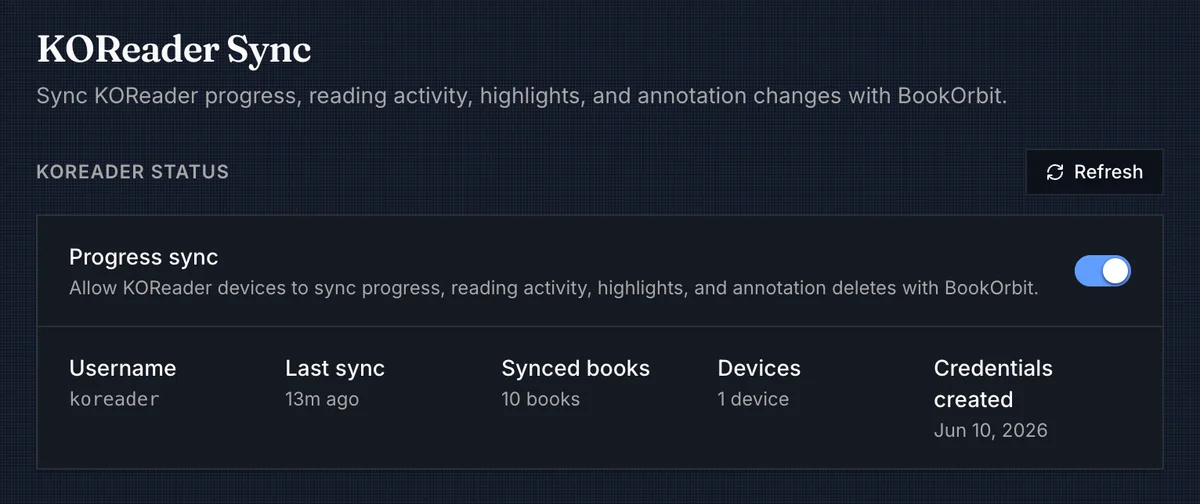
The KOReader account is separate from the normal BookOrbit login. A user with koreader_sync creates one username and password in Settings > Integrations > KOReader. That account belongs to the same BookOrbit user, so every sync request is still scoped to that user's accessible libraries and permissions.
The Progress sync toggle is the kill switch for the device account. When it is off, paired KOReader devices stop syncing. Deleting the credentials disconnects the devices, but the progress, reading sessions, and annotations already stored in BookOrbit remain.
| Permission | Access |
|---|---|
koreader_sync | Open KOReader settings, create or delete sync credentials, download the plugin package, view device activity, and authenticate KOReader sync requests. |
If the BookOrbit user is disabled or loses koreader_sync, the KOReader credentials stop working.
Installing The Plugin
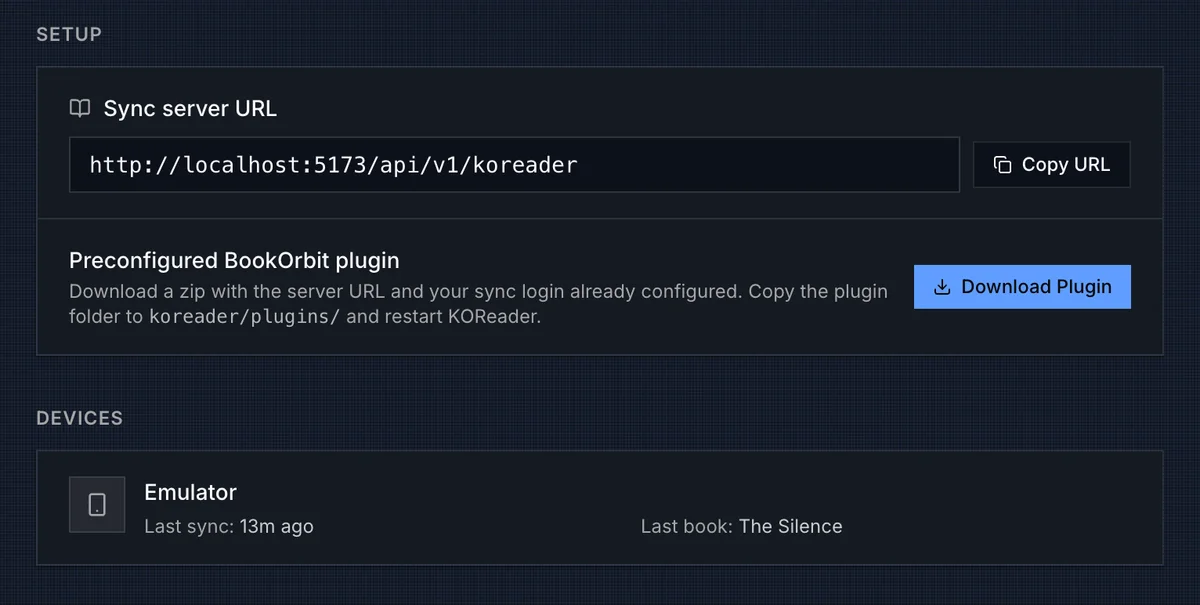
After credentials exist, BookOrbit shows the sync server URL and a Download Plugin button. The download is a preconfigured bookorbit.koplugin.zip; it includes the BookOrbit origin, username, and KOReader-compatible password key so you do not have to type them on the device.
Install it like a normal KOReader plugin:
- Download the plugin package from BookOrbit.
- Unzip
bookorbit.koplugin.zip. - Copy
bookorbit.koplugintokoreader/plugins/on the KOReader device. - Restart KOReader.
- Open a book and use Tools > BookOrbit sync.
TIP
The URL in local screenshots may use localhost. A real device needs the public BookOrbit URL it can reach over the network, such as https://books.example.com/api/v1/koreader.
If the server cannot build the plugin package, the BookOrbit server likely cannot find the plugin source directory. In that case, configure KOREADER_PLUGIN_PATH on the server to point at the plugin source.
First Sync
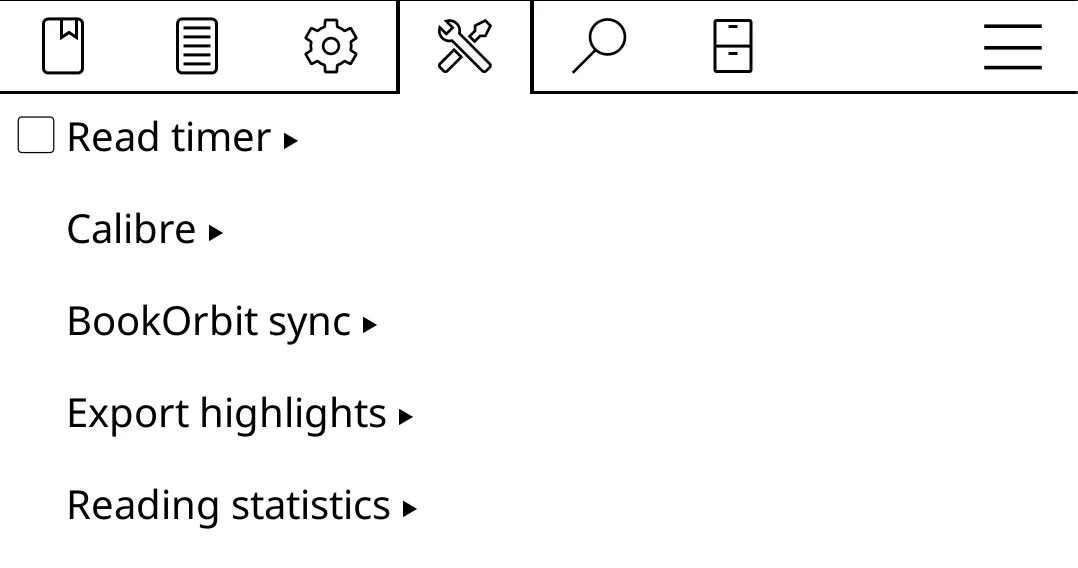
The plugin does not ask BookOrbit for a reading list. When you sync the open book or run a full sync, it computes the same KOReader document fingerprint BookOrbit stores for scanned files and asks which fingerprints match files in libraries the user can access. That fingerprint match is why the same EPUB file matters: BookOrbit syncs against the stored file identity, including previous identities kept after BookOrbit has rewritten or rescanned a file.
When a book matches, the plugin can send progress, page statistics, book state, rating, and annotation changes for that file. Unmatched files are skipped instead of creating new library entries.
WARNING
For reliable sync, put the BookOrbit-managed copy of the book on the KOReader device. A manually copied file can still match if it produces the same KOReader fingerprint BookOrbit scanned, but a converted, edited, re-zipped, or metadata-rewritten copy will usually have a different identity and will not sync to that BookOrbit book.
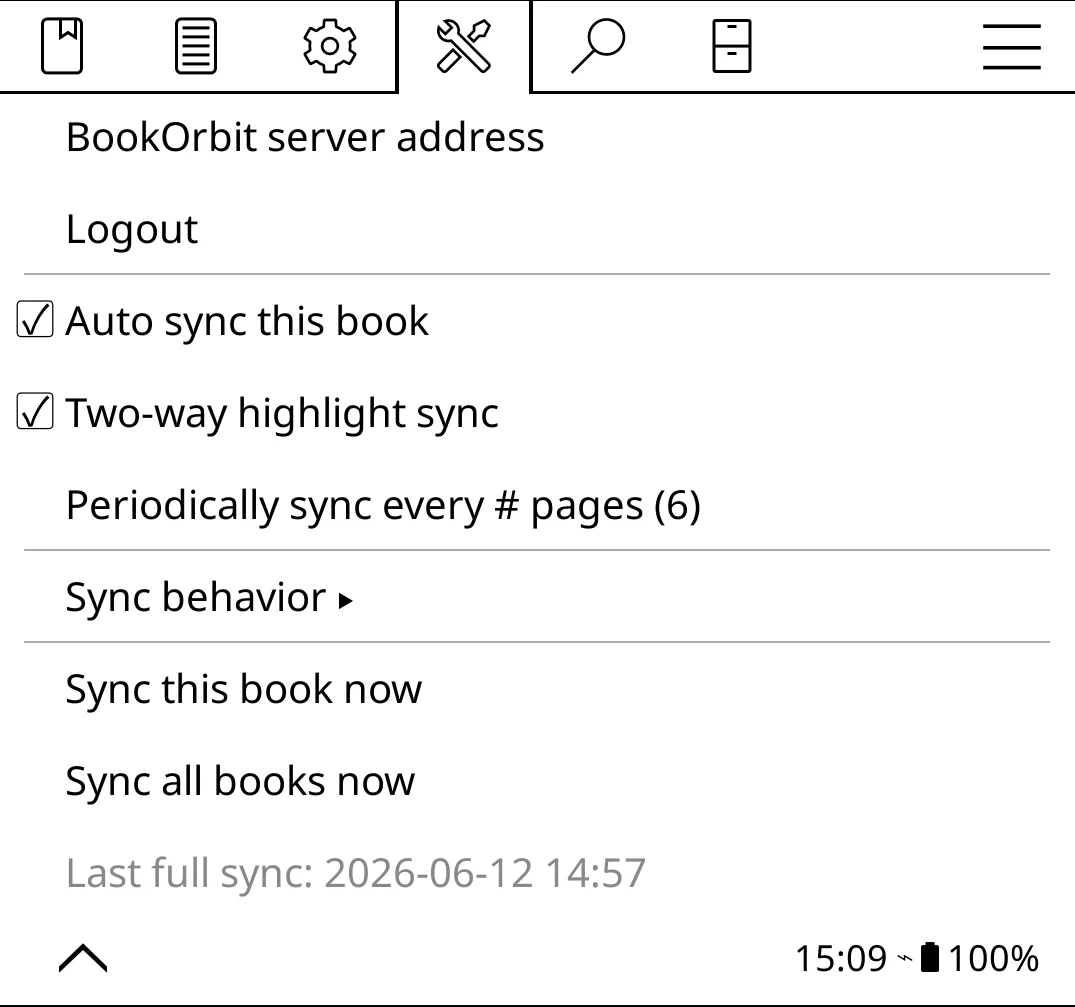
The device-side panel is where you control live sync for the open book and start manual syncs.
| Option | Behavior |
|---|---|
| Auto sync this book | Pulls progress when a book opens. On close or suspend, uploads the open book's progress, highlights, status, rating, and reading time. |
| Two-way highlight sync | Also applies BookOrbit highlight, note, and delete changes back to KOReader. When off, local KOReader highlight changes still upload. |
| Periodically sync every # pages | Pushes progress after the configured number of page turns, once reading has been idle briefly. Set it to 0 to disable page-turn progress pushes. |
| Sync behavior | Sets separate choices for Sync to a newer state and Sync to an older state: apply silently, prompt first, or never move. |
| Sync this book now | Runs the full open-book sync immediately: progress, reading events, highlights, status, and rating. |
| Sync all books now | Runs a manual device sweep across matched books from KOReader history, statistics, and sidecar files. |
Full-library sweeps are manual. They are useful after installing the plugin on a device that already has reading history, but they still only upload files KOReader can fingerprint and BookOrbit can match. If an old sidecar file reports stale progress, BookOrbit records the device state without rolling the shared book progress backward.
Three-Way Sync
The powerful part is that KOReader does not have to live in a separate lane. BookOrbit can sit between the web reader, KOReader, and Kobo, keeping the newest reading position and annotation state moving through the same book record.
With Kobo two-way progress sync enabled, progress reported by KOReader can advance the Kobo bookmark on the next Kobo sync. Progress from Kobo can also update BookOrbit, and a later KOReader sync can pick up that newer BookOrbit position. For highlights, KOReader changes land in BookOrbit first; if Sync BookOrbit highlights to Kobo is enabled in Kobo settings, those BookOrbit and KOReader highlights can be offered to Kobo as well. Kobo highlight import works independently, and linked annotations can continue syncing edits and deletes through BookOrbit.
Kobo-side return sync depends on Kobo settings and KEPUB delivery. If Kobo is sending regular EPUBs instead of KEPUBs, BookOrbit may still record progress, but precise Kobo restore and BookOrbit-to-Kobo highlight placement are limited.
What Comes Back To BookOrbit
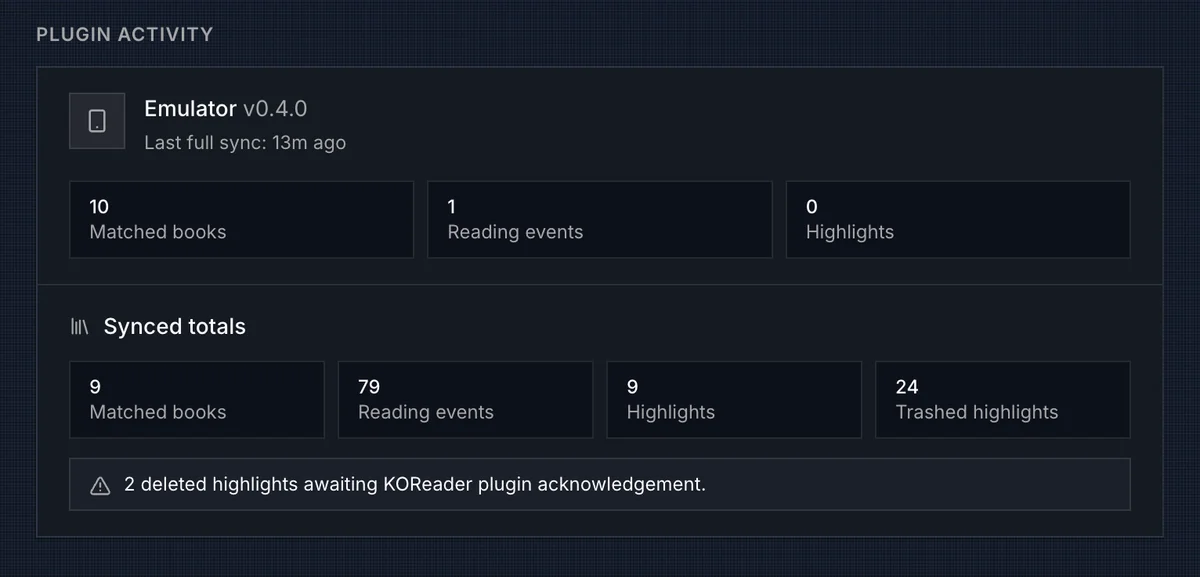
The settings page becomes useful after the first book sync or full sweep. Devices shows the last device progress update and the last book title seen from that device. Plugin Activity shows the richer plugin path: matched books, reading events, highlights, trashed highlights, pending deletes, failed positions, and the plugin version that reported the last full sweep.
BookOrbit stores several kinds of KOReader state:
| Data | How BookOrbit uses it |
|---|---|
| Progress | Stores a per-device KOReader position, updates BookOrbit file progress, and auto-updates the user's book status when progress crosses the app's normal thresholds. |
| Reading events | Converts KOReader page-stat events into reading sessions, reading-log rows, daily stats, and achievement activity. |
| Highlights and notes | Creates or updates BookOrbit annotations with KOReader text, note, style, color, chapter, page, and device position. |
| Annotation deletes | Soft-deletes the matching BookOrbit annotation and tracks whether other devices still need to acknowledge the delete. |
| Book status | Maps KOReader reading, complete, and abandoned states to BookOrbit Reading, Finished, and Abandoned when the device change is newer. |
| Rating | Writes a KOReader 1-5 rating to the user's BookOrbit rating when the device change is newer. A missing device rating does not clear the BookOrbit rating. |
Reading sessions are derived from page-stat clusters. Events within a 30 minute gap stay in one session; a longer gap starts another session. Very short sessions under 10 seconds are ignored. If an older sync later fills a gap, BookOrbit can recompute the sessions for that device and file so the reading log stays consistent.
Position Sync
Progress moves both ways. When KOReader syncs, BookOrbit updates the book's file progress, read status, and book detail progress source. When KOReader opens a book, reconnects, or pulls progress manually, BookOrbit sends back the newest known progress for that file.
| Newer source | What KOReader receives |
|---|---|
| KOReader | The last KOReader position for that device/book file. |
| BookOrbit web reader | The latest BookOrbit reading position, translated as closely as possible for KOReader. |
KOReader-to-BookOrbit restore is usually the most exact path because it starts with a native KOReader position. BookOrbit-to-KOReader restore may land nearby rather than at the exact line when the position came from another reader.
Highlight Sync
Highlight sync is bidirectional with the BookOrbit plugin. Highlights, notes, style changes, and deletes made in KOReader can appear in BookOrbit annotations, and BookOrbit annotation changes can return to KOReader on the next sync.
BookOrbit keeps enough device state to avoid turning edits or moved highlights into duplicates. Deletes are also tracked until the device confirms that it applied them, which is why the settings page can show pending deleted highlights.
Colors and highlight styles are mapped between KOReader and BookOrbit palettes. Most highlights sync quietly; if BookOrbit cannot place a highlight back into KOReader, it is counted under failed positions so you know something needs attention.
Reading Log And Book Pages
KOReader sessions appear in the same reading log as manual and web-reader sessions, with KOReader as the source. Progress from KOReader also appears on book details as a KOReader progress source when the user has koreader_sync.
On a book page, BookOrbit keeps the canonical progress source by timestamp. If KOReader has the newest update, the KOReader percentage and chapter are shown. If the web reader is newer, the web-reader progress remains canonical. BookOrbit also records when a file was modified after the last KOReader sync so stale device state can be surfaced.
Cleanup

Deleting credentials removes the KOReader account and disconnects paired devices. It does not erase existing BookOrbit reading progress, reading sessions, highlights, or ratings. Create new credentials when you want to pair devices again.
Troubleshooting
| Symptom | Check |
|---|---|
| Device cannot log in | Confirm the BookOrbit user has koreader_sync, the KOReader account exists, sync is enabled, and the device can reach the public /api/v1/koreader URL. |
| Plugin download fails | Confirm the server has access to the BookOrbit KOReader plugin source, or set KOREADER_PLUGIN_PATH. |
| No books match | Confirm the same book files exist in BookOrbit, the user can access their libraries, and the device copy has not been modified into a different document fingerprint. |
| Auto sync cannot be enabled | On KOReader devices with seamless Wi-Fi control, set Network > Action when Wi-Fi is off to turn Wi-Fi on. KOReader blocks auto sync when that setting is not enabled. |
| Progress appears but no reading sessions appear | Confirm the BookOrbit KOReader plugin is installed and has uploaded page statistics. |
| Highlights do not move both ways | Enable Two-way highlight sync in the KOReader BookOrbit sync panel and run another sync for the book. |
| Deleted highlights remain pending | Sync the KOReader device again so it can acknowledge the delete. Pending deletes are kept until the device reports that it applied them. |
| Restore lands near the chapter, not the exact line | BookOrbit may only have an approximate translated position for that direction. Open and sync the book once from KOReader to store a native KOReader position. |