Kobo Sync
Kobo sync starts as a device pairing, but the useful part is what happens after the first sync. BookOrbit becomes the account endpoint your Kobo talks to: it offers the books you chose, serves covers and downloads, accepts Kobo reading state, and can feed newer BookOrbit or KOReader progress back to the device.
Use Kobo sync when you want a real Kobo library fed from BookOrbit, with optional three-way progress and highlight movement between Kobo, BookOrbit, and KOReader.
Pair A Device
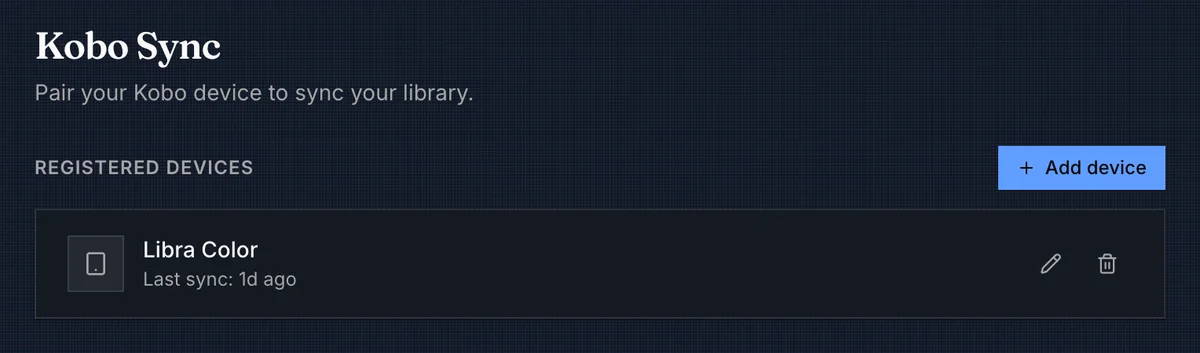
A user with kobo_sync opens Settings > Kobo, adds a device, and gives it a friendly name. BookOrbit creates a private sync URL for that device:
https://books.example.com/api/v1/kobo/{deviceToken}Enter the full URL on the Kobo when adding an account. Kobo may still ask for a username and password; BookOrbit authenticates the token in the URL, so those fields are not used for BookOrbit login.
WARNING
The sync URL is shown only once and works like a password. If it is lost or exposed, revoke the device and add it again.
| Action | Effect |
|---|---|
| Add device | Creates a device token and shows the one-time sync URL. |
| Rename | Changes the label in BookOrbit. It does not change the Kobo device. |
| Revoke | Deletes the token. That Kobo cannot sync again until it is paired with a new device entry. |
| Last sync | Updates when the device contacts BookOrbit. |
| Permission | Access |
|---|---|
kobo_sync | Open Kobo settings, manage paired devices, update sync preferences, and allow device-token sync requests. |
Devices and settings are scoped to the BookOrbit user. If the user is disabled or loses kobo_sync, existing Kobo tokens stop working.
TIP
Use the public BookOrbit URL that the Kobo can reach on its network. If BookOrbit sits behind a reverse proxy, forward the public host and protocol so generated cover, metadata, and download URLs point back to the same reachable address.
Choose The Books
Kobo sync is driven by collections. Add books to a collection, turn on Sync to Kobo for that collection, then run a sync on the device. BookOrbit sends the eligible books and also sends the synced collections as Kobo tags, so your shelves stay grouped on the device.
A book is eligible only when all of these are true:
- The user has access to the book's library.
- The book is
present. - The user's content filters do not exclude it.
- The book is in at least one collection with Sync to Kobo enabled.
- The book's primary file is EPUB.
If a book has an EPUB file but a different primary file, Kobo sync will skip it. Set the EPUB as the primary file before expecting it on the device.
WARNING
Use the copy delivered by the BookOrbit Kobo account, not a sideloaded copy of the same title. BookOrbit ties Kobo sync state to the entitlement and file it served, and precise progress restore or outbound highlight placement depends on the BookOrbit-delivered KEPUB.
BookOrbit keeps a per-user library snapshot so the Kobo receives deltas instead of the whole library every time.
| Change in BookOrbit | What Kobo receives on the next sync |
|---|---|
| New eligible book | A new entitlement with metadata, cover, download URL, and reading state. |
| File or delivery setting changes | A new download is offered for the book. |
| Title, author, series, cover, or metadata changes | Updated Kobo product metadata. |
| Book leaves all synced collections | A removal from the Kobo library. |
| Synced collection membership changes | Updated Kobo tag membership. |
Sync responses are paged, so a large change set may take several device sync passes in the same Kobo sync operation.
Removing a book on the Kobo does not delete it from BookOrbit. If the book still belongs to a synced collection, BookOrbit can offer it again on a later sync.
Sync Preferences
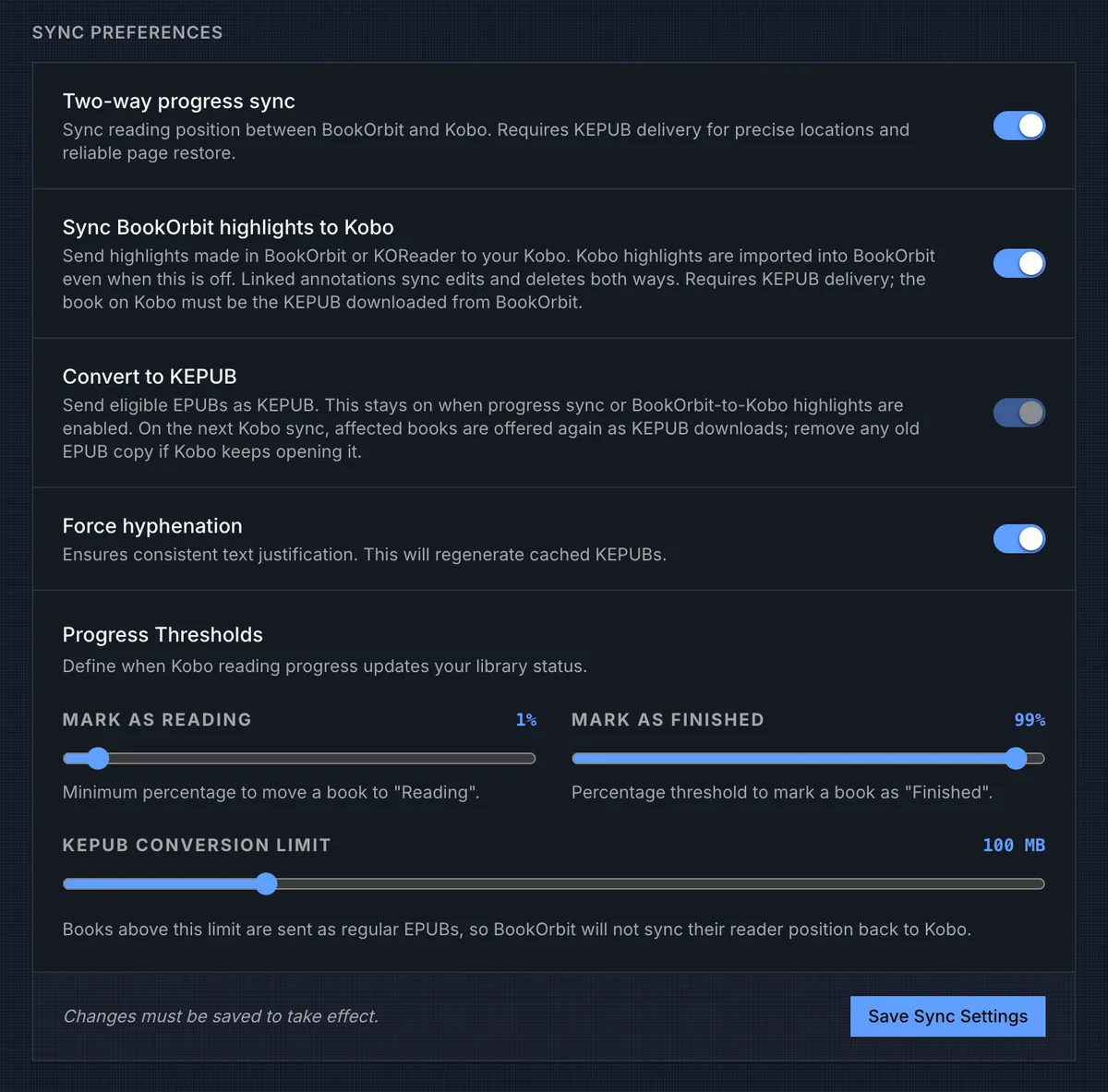
Preferences apply to the current BookOrbit user and must be saved before they change device behavior.
| Setting | Behavior |
|---|---|
| Two-way progress sync | Lets Kobo progress update BookOrbit's shared reader position, and lets newer BookOrbit or KOReader progress update the Kobo bookmark. Kobo reading state and status thresholds are still stored when this is off. Precise restore requires KEPUB delivery. |
| Sync BookOrbit highlights to Kobo | Sends BookOrbit and KOReader highlights to Kobo when they can be placed in the KEPUB. Kobo highlights still import into BookOrbit when this is off. |
| Convert to KEPUB | Serves eligible EPUBs as KEPUB downloads. This is on by default and is forced on when two-way progress sync or BookOrbit-to-Kobo highlight sync is enabled. |
| Force hyphenation | Regenerates KEPUBs with kepubify hyphenation enabled. |
| Mark as Reading | Kobo progress at or above this percentage can move the BookOrbit book status to Reading. |
| Mark as Finished | Kobo progress at or above this percentage can move the BookOrbit book status to Finished. |
| KEPUB conversion limit | EPUBs above this size are sent as regular EPUBs, which prevents BookOrbit from sending precise Kobo restore positions or outbound highlights for those files. |
The reading threshold must be lower than the finished threshold. These thresholds control library status only; they do not decide whether Kobo reading state is stored.
KEPUB Delivery
BookOrbit uses KEPUB as the bridge format for Kobo-specific positions. When conversion is enabled and the EPUB is under the configured size limit, the first Kobo download creates a cached .kepub.epub using kepubify. Later downloads reuse the cache until the source file identity or hyphenation setting changes.
If conversion fails, BookOrbit falls back to the original EPUB so the book can still download. That fallback is readable on Kobo, but precise BookOrbit-to-Kobo progress restore and BookOrbit-to-Kobo highlights depend on the KEPUB path.
When you enable progress sync, highlight sync, hyphenation, or change the KEPUB size limit, BookOrbit marks affected books for re-delivery. On the next Kobo sync, the device may offer those books again as downloads. If Kobo keeps opening an older EPUB copy, remove the old copy from the device and download the BookOrbit KEPUB.
Three-Way Progress
With Two-way progress sync enabled, BookOrbit connects the Kobo reader to the same progress record used by the web reader and KOReader.
| Direction | Behavior |
|---|---|
| Kobo to BookOrbit | Kobo reading state is stored. If two-way progress sync is enabled and the bookmark includes a KoboSpan location, BookOrbit converts it to the canonical web-reader and KOReader position when a matching KEPUB context is available. |
| BookOrbit to Kobo | Newer web-reader progress can be converted back into a KoboSpan bookmark when the Kobo asks for reading state. |
| KOReader to Kobo | KOReader progress lands in BookOrbit first. If Kobo two-way progress sync is enabled, that progress can advance the Kobo bookmark on the next Kobo sync. |
| Status updates | Kobo progress can update the BookOrbit book status using the Reading and Finished thresholds. |
That is the powerful part of the feature: Kobo, KOReader, and the BookOrbit web reader do not have to be separate progress islands. Read on the Kobo, sync, and BookOrbit can move KOReader forward later. Read in KOReader, sync, then let Kobo pick up the newer position during its next sync. BookOrbit keeps newer state from being overwritten by older device state, and KEPUB delivery is what makes the Kobo side precise instead of percent-only.
Highlights And Notes
Kobo highlight import is accepted for synced books. Highlights and notes made on the Kobo are written into BookOrbit annotations, with Kobo positions converted into BookOrbit and KOReader-friendly positions when the KEPUB context is available.
The Sync BookOrbit highlights to Kobo switch controls the opposite direction. When it is on, highlights made in BookOrbit or KOReader can be offered to Kobo. When it is off, BookOrbit still imports Kobo highlights, and annotations already linked to Kobo can continue syncing edits and deletes instead of becoming duplicates.
For outbound highlights, the book on the Kobo needs to be the KEPUB downloaded from BookOrbit. If the device is reading a regular EPUB, a manually copied file, or a file above the conversion limit, BookOrbit may not be able to place the highlight back on Kobo.
Reading Activity And Ratings
Kobo sends more than bookmarks. BookOrbit ingests Kobo analytics events for synced books:
| Kobo event | BookOrbit result |
|---|---|
| Opening and leaving a book | Creates a reading session with duration, end progress, and progress delta when Kobo provides enough data. |
| Rating a book | Updates the user's BookOrbit rating. A zero-star Kobo rating clears the rating in BookOrbit. |
Reading sessions use the active reading time Kobo reports. If Kobo reports idle time, BookOrbit subtracts it before saving the session.
Analytics are tied back to the synced EPUB-primary BookOrbit book. If a device event cannot be resolved to a BookOrbit-served book the user can access, BookOrbit skips that event instead of guessing.
Troubleshooting
| Symptom | Check |
|---|---|
| The Kobo cannot add the account | Confirm the full sync URL is reachable from the Kobo and includes /api/v1/kobo/{deviceToken}. |
| The sync URL was lost | Revoke the device and add it again. BookOrbit intentionally shows the token once. |
| No books appear | Confirm the user has kobo_sync, the books are in a Sync to Kobo collection, the books are present, content filters allow them, and the primary file is EPUB. |
| A shelf is missing or incomplete | Confirm that collection has Sync to Kobo enabled and contains eligible EPUB-primary books. |
| Deleted books keep returning | Remove the book from synced collections in BookOrbit, or disable Sync to Kobo for that collection. Deleting the local Kobo copy does not delete the BookOrbit book. |
| Kobo progress stores status but does not move reader position | Enable Two-way progress sync and make sure the book is delivered as KEPUB. |
| BookOrbit or KOReader progress does not reach Kobo | Enable Two-way progress sync, download the BookOrbit KEPUB on the Kobo, then run another Kobo sync. |
| Kobo highlights import but BookOrbit highlights do not appear on Kobo | Enable Sync BookOrbit highlights to Kobo and use the BookOrbit KEPUB copy of the book. |
| KEPUB conversion is skipped | Check the conversion limit. Files above the limit are served as regular EPUBs. |
| A changed KEPUB is not opening | Remove the older EPUB or KEPUB copy from the Kobo and download the book again from the BookOrbit account. |