Hardcover Sync
Hardcover sync pushes BookOrbit reading data into a user's Hardcover account. It can update read status, reading dates, progress, rating, and privacy for books that BookOrbit can match to Hardcover.
The integration is user-scoped. Each BookOrbit user connects their own Hardcover API token, chooses which changes should trigger sync, and gets their own cached match state.
Connect The Account
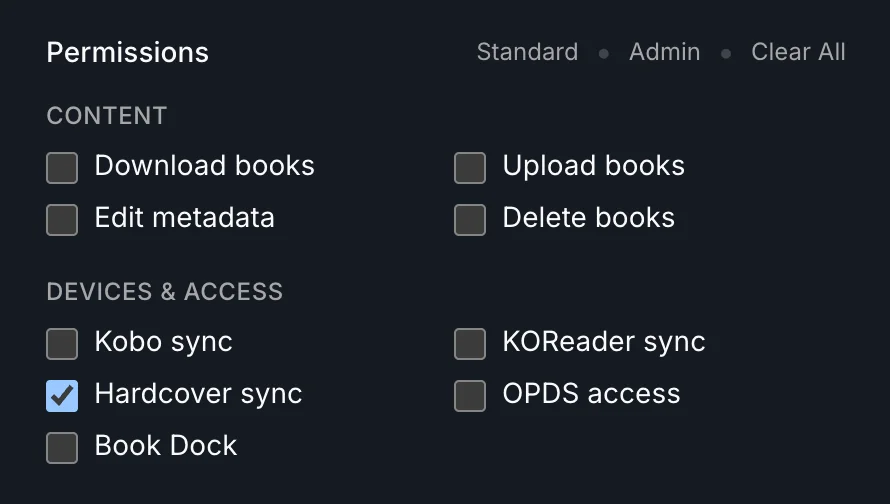
Start by giving the user the hardcover_sync permission. That permission opens Settings > Integrations > Hardcover and allows that user to call the Hardcover sync endpoints.
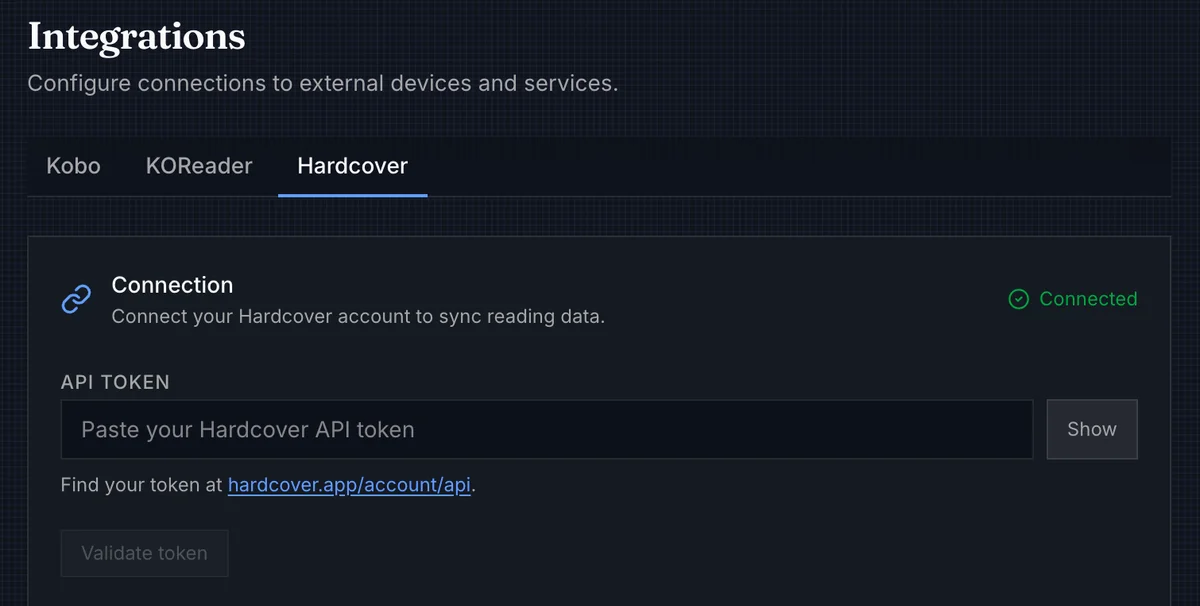
Paste the user's Hardcover API token from hardcover.app/account/api, optionally validate it, then save. BookOrbit strips a leading Bearer prefix if you paste one. The token is stored for that user and is not shown back in the UI.
| Setting | Behavior |
|---|---|
| Enable sync | Pauses or resumes this user's Hardcover integration without deleting the token. |
| Sync on status change | Queues sync when a book status changes. |
| Sync on progress update | Queues sync when BookOrbit progress changes or a reading session is saved. KOReader progress enters through this path after it updates BookOrbit. |
| Sync on rating change | Queues sync when the user's BookOrbit rating changes. |
| Privacy | Sends Public, Followers only, or Private as the default visibility for synced Hardcover books. |
Sync is effectively enabled only when the user is active, has hardcover_sync, has a saved token, and Enable sync is on.
What BookOrbit Sends
Only books with a non-Unread BookOrbit status are eligible. This keeps untouched library inventory from creating Hardcover entries.
| BookOrbit data | Hardcover update |
|---|---|
| Status | Maps Want to Read, Reading, Rereading, On Hold, Read, Skimmed, and Abandoned to Hardcover statuses. |
| Progress | Converts percentage to Hardcover progress pages when the matched Hardcover edition has a page count. |
| Reading dates | Sends started and finished dates when BookOrbit has them. |
| Rating | Sends the user's BookOrbit star rating when one is set. |
| Privacy | Applies the privacy setting saved in Hardcover settings. |
Progress depends on pages. If BookOrbit matches a Hardcover book but cannot find an edition page count, status, dates, rating, and privacy can still sync, but progress waits until a usable edition is available.
Matching Books
BookOrbit has to identify the Hardcover book before it can update anything. Matching is attempted in this order:
- A cached previous Hardcover match, unless that match is marked with an error.
- The saved Hardcover provider ID in BookOrbit metadata. This can be a numeric Hardcover book ID or a Hardcover slug.
- ISBN-13.
- ISBN-10.
- Title plus first author.
ISBN and title matching are useful fallbacks, but they are still guesses. For books you care about, the best anchor is a verified Hardcover result saved through the normal metadata workflow.
To save that anchor, open the book, go to Edit Metadata, use Search online, choose the correct Hardcover result, apply it, and save. For the full metadata workflow, see Book Details, Editing, and Viewer and Metadata.
TIP
If a book previously failed with no_match, save the correct Hardcover provider ID and sync again. BookOrbit treats a new Hardcover metadata ID as a reason to retry the match.
Automatic Sync
Automatic sync listens to BookOrbit activity and runs only when the matching trigger is enabled.
| Trigger | What queues sync |
|---|---|
| Status | A BookOrbit status change for a non-Unread book. |
| Progress | Web reader progress, a saved reading session, or KOReader progress after it lands in BookOrbit. |
| Rating | A BookOrbit rating change for one or more books. |
Changes for the same user and book are debounced briefly, then serialized per user. If progress and status change together, BookOrbit folds them into one sync attempt instead of sending separate updates.
Manual Sync

Manual sync is the catch-up button. Use it after first setup, after importing a library, after fixing metadata matches, or after turning sync back on.
The pending count is local: it counts eligible books whose BookOrbit status, progress, rating, or dates differ from the last recorded sync attempt. It is not a matching report. A book can fail with no_match, stop appearing as pending because nothing changed afterward, then become pending again after you save a correct Hardcover ID.
Manual sync streams progress while it runs and can be cancelled from the settings page.
KOReader Progress
KOReader does not talk to Hardcover directly. The path is:
KOReader -> BookOrbit progress -> Hardcover syncAfter KOReader updates BookOrbit, Hardcover uses the same matching rules, progress conversion, and trigger settings as any other progress update. A saved BookOrbit percentage proves KOReader sync arrived; it does not prove BookOrbit found the right Hardcover record or page count.
Troubleshooting
| Symptom | Check |
|---|---|
| Hardcover page is missing | Confirm the user has hardcover_sync. |
| Token validation fails | Confirm the token came from hardcover.app/account/api and belongs to the intended Hardcover account. |
| Manual sync is unavailable | Confirm a token is saved, Enable sync is on, the user still has permission, and there are pending books. |
| No eligible books | Hardcover sync ignores books with the Unread status. Mark a book Want to Read, Reading, Read, or another mapped status first. |
| Progress does not update | Confirm the book has a Hardcover match and the matched edition has pages. |
| Rating does not appear | Confirm Sync on rating change is enabled and the BookOrbit book has a star rating set. |
Book logs or stores no_match | Save the correct Hardcover provider ID from metadata search, then sync again. |
| Wrong Hardcover book is used | Replace the saved Hardcover provider ID with the correct result and run manual sync. |
| Pending count looks wrong | Pending means local data differs from the last sync attempt, not every book that ever failed. |