
Story Guides
A story guide is a who’s who for a book. The server reads the book once, finds everyone and everything with a name, works out who is tied to whom, and writes what each of them is like at every chapter. The iPhone app shows the entry for the chapter you have reached, so the same person reads differently at chapter 4 and at chapter 20.
The guide is built ahead of time and stored on the server, so reading with it does not call the AI provider and costs nothing. It is also shared: one build serves everyone on the server who can read that book.
Story guides power Constellations in the BookOrbit app for iPhone. Constellations & Reading Help shows them from the reader’s side; this page is for the person who builds them.
Before you start
Section titled “Before you start”- A provider is connected and Story guides is switched on. See Setting Up AI.
- You have the permission. Build story guides (
library_generate_story_guide). Administrators with App settings manage everyone’s guides. - The book has a text file. A guide is read from an EPUB, KEPUB, MOBI or AZW file. PDFs, comics and audiobooks do not get one. The book must not be too short, and must be shorter than the Longest book limit, which is 400,000 words unless an administrator changed it.
- The book is in English or Spanish. Spanish arrives with the next BookOrbit release; until then, only English books can be built. BookOrbit goes by the book’s text, so a Spanish book whose metadata says English still counts as Spanish. A book in another language gets no Build: from the next release the Story guide card says which languages work, and the iPhone app shows the same note from its next update. Earlier versions hide the card for such a book. Other languages will be opened up once guide quality has been tested for each; this page will say so when that happens.
Building one
Section titled “Building one”Open a book. In the column on the right, below Editions, sits a Story guide card. On a book without a guide it offers Build. On a finished guide, like this one for Harry Potter and the Sorcerer’s Stone, it says when the guide was built and with which model.

Select Build and a dialog says what is about to happen: the server’s AI reads the whole book once, and everyone who reads it can use the result. It also shows an estimate, in dollars and, once the server has finished a build on that model, in minutes too. Until then the time reads “shows after the first finished build”, because time is learned from real builds rather than guessed.
Confirm, and the card follows the build. Only so many builds run at once (one, unless an administrator allowed more), so a build may wait its turn, and the card says how many books are ahead. Once it starts, it names the stage it is in, shows a progress bar and estimates how long is left.
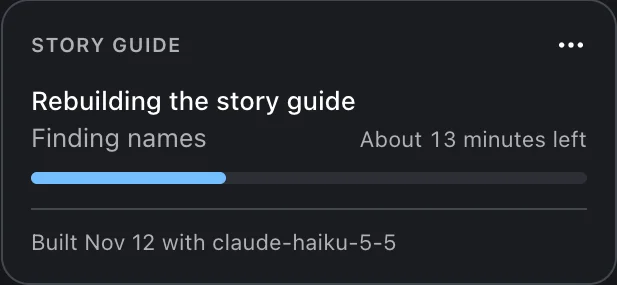
The stages, in order:
| Stage | What is happening |
|---|---|
| Reading the book | The text is opened and prepared. |
| Finding names | Each passage is read for people, places and terms. |
| Checking who’s who | The same person under several names (“Hagrid”, “Rubeus”, “Keeper of Keys”) is merged into one. |
| Finding ties | Who is family, who works for whom, who is friends with whom. |
| Writing descriptions | A line for each character, chapter by chapter. |
| Writing summaries | A short summary of each chapter. |
| Finishing up | The guide is stored. |
You can leave the page. The build runs on the server, and you get a notification when it is ready or when it fails; those can be changed under Settings > Notifications in the Story guides group.
Update, rebuild, delete
Section titled “Update, rebuild, delete”The card’s menu (the three dots) holds what can be done to a finished guide.

| Action | What it does |
|---|---|
| Update story guide | Offered, with a note that an improved guide is available, when BookOrbit has improved what a guide contains since yours was built. Only the new parts are redone, so it costs a fraction of a build. |
| Rebuild from scratch | Builds the guide again from the start and replaces the current one when it finishes. Use it after changing the models, or when the book’s file has changed. |
| Delete story guide | Removes it for everyone who reads that book. |
Rebuilding and deleting both ask first, and both say what is kept.
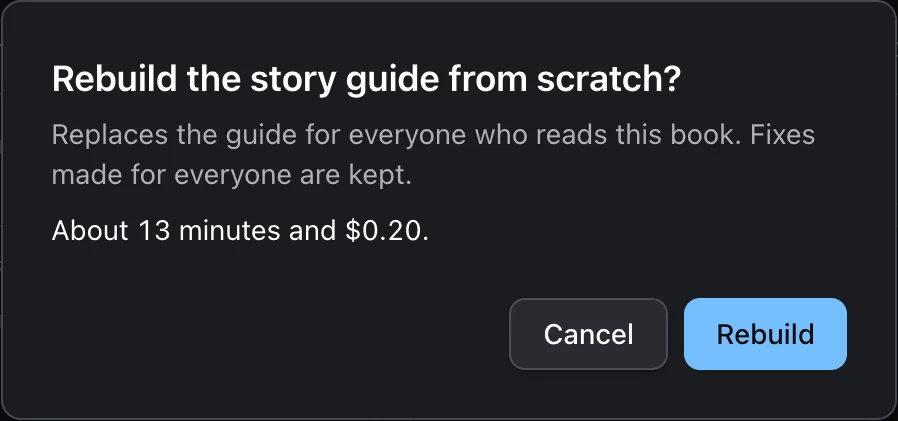
Corrections that readers made to a guide are kept across a rebuild, so a fixed name stays fixed. If a rebuild is cancelled, the current guide stays.
When a build stops
Section titled “When a build stops”A build pauses instead of failing wherever it can, because the work done so far is kept. The card says why, in words:
| Message | What it means and what to do |
|---|---|
| This month’s AI budget is used up | Raise the limit in Spending, or wait for the month to turn. |
| This build is costing more than expected | It passed three times its estimate. Continue lets it spend as much again; Cancel build keeps what it has done. |
| The AI provider didn’t accept the key | Edit the provider and enter the key again. |
| The AI provider isn’t responding | Nothing to do. It keeps trying. |
| The AI model is no longer available | Choose another model for the slot. |
| No AI model is chosen for story guides | Pick a model for the Fast and Careful slots. |
| Story guides were turned off | Switch the feature back on. |
| The AI provider refused too much of this book | Some content tripped the provider’s filters. A different model may work. |
| This book is longer than this server’s limit | Raise Longest book (words), or leave it. |
Following builds: the AI page
Section titled “Following builds: the AI page”Someone who may build story guides, or manage the server’s settings, gets an AI entry, the sparkles icon, in the sidebar’s top row. It appears once Story guides is switched on, and for an administrator it stays while any guide exists. It has two tabs: Activity for everyone who can see it, and Story guides for administrators.
Activity
Section titled “Activity”Activity is the queue: everything running, waiting or paused.

Queue, Failed and History are the three views. Each row shows the book, its status, how far it has got and what it has cost. People who build see their own jobs under Mine; administrators can switch to Everyone’s, which adds who asked for each one.
Rows can be acted on one at a time or in bulk with the checkboxes:
| Action | When it is there |
|---|---|
| Pause and Resume | A running or paused build. A paused build keeps its progress. |
| Move to front | A queued build you would like next. |
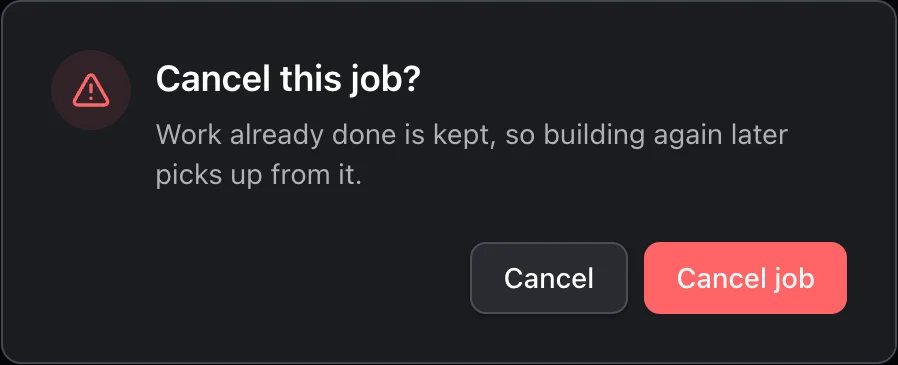
| Cancel | Anything that has not finished. The work done so far is kept for next time. It asks first. |
| Try again | A failed build. |
| Dismiss | A finished or failed row you no longer need to see. |
Story guides
Section titled “Story guides”The second tab, for administrators, is the shelf of everything built.
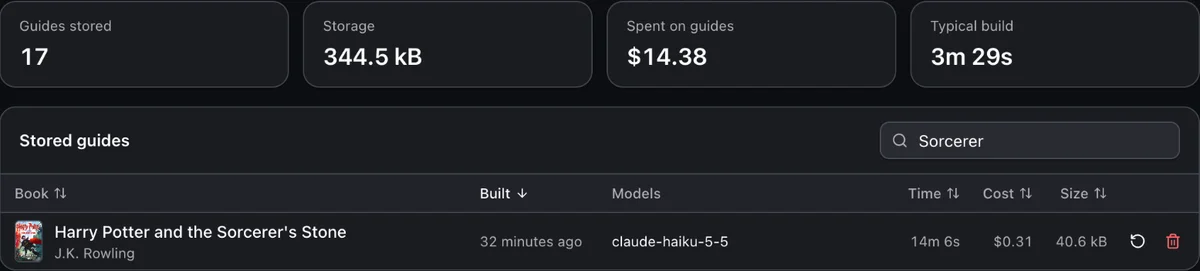
The four figures at the top say how many guides are stored, how much space they take, what they have cost and how long a typical build takes. Below, each guide shows when it was built, with which models, how long it took, what it cost and its size, and has Rebuild and Delete beside it. Search by title when the shelf gets long.
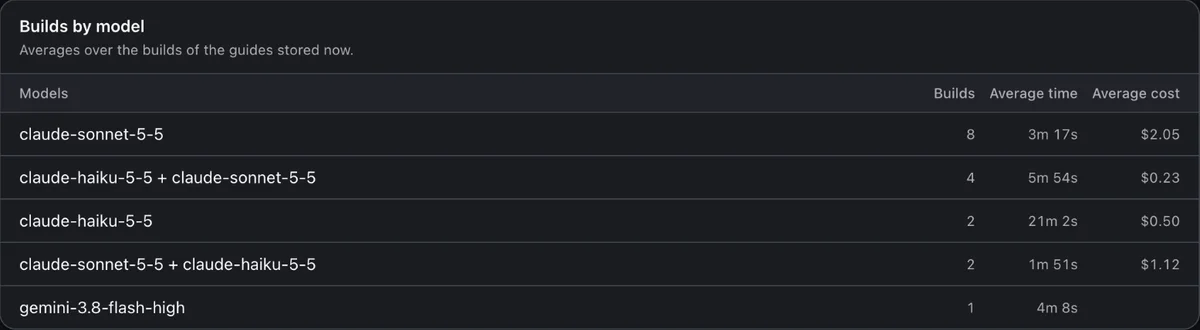
Further down, Builds by model compares the models you have used.
Model speed shows the speed BookOrbit has learned for each model, per step, which is where the estimates in the confirmation dialog come from. Reset forgets a model’s speed if it changed under you, for example when a provider swapped the model behind a name.
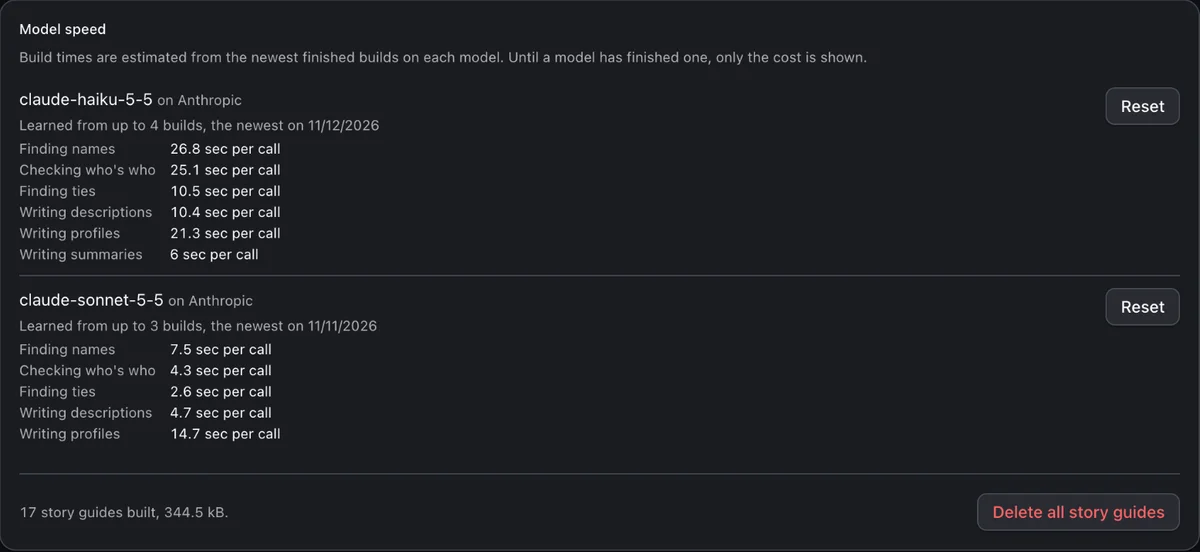
Guides are small, typically tens of kilobytes. Delete all story guides, at the foot of the Model speed card, deletes every guide and asks whether to keep the corrections readers made for everyone. The Story guides row in Settings > Server > AI links here with Open story guides.
- Try one book first. If you are unsure of a model, build one short book and compare the result against the estimate before queueing a whole series.
- Keep builds to one at a time unless your provider’s rate limits allow more. It keeps spending steady and the queue easy to follow.