
Kobo Sync
Kobo sync starts as a device pairing, but the useful part is what happens after the first sync. BookOrbit becomes the account endpoint your Kobo talks to: it offers the books you chose, serves covers and downloads, accepts Kobo reading state, and can feed newer BookOrbit or KOReader progress back to the device.
Use Kobo sync when you want a real Kobo library fed from BookOrbit, with optional three-way progress and highlight movement between Kobo, BookOrbit, and KOReader.
Pair A Device
Section titled “Pair A Device”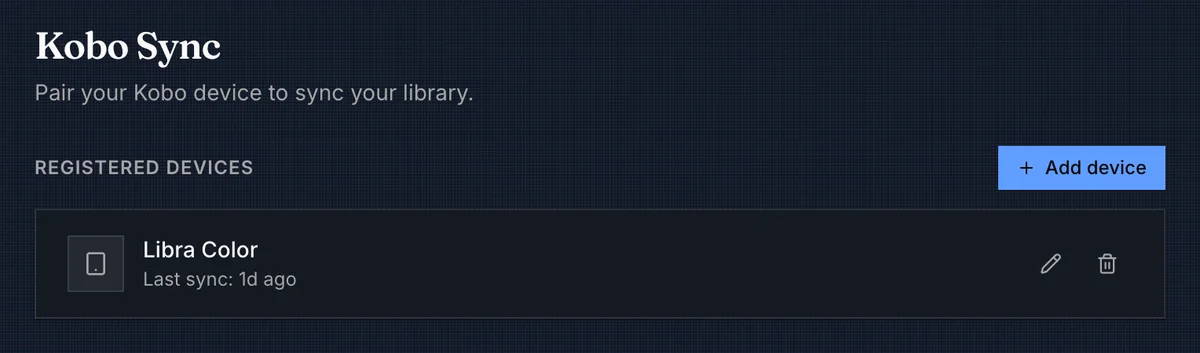
A user with kobo_sync opens Settings > Kobo, adds a device, and gives it a friendly name. BookOrbit creates a private sync URL for that device:
https://books.example.com/api/v1/kobo/{deviceToken}Point Kobo To BookOrbit
Section titled “Point Kobo To BookOrbit”Kobo does not provide a screen for entering a custom sync server. Set the URL by editing the device configuration over USB.
-
Keep the sync URL visible or copy it somewhere private. It is shown only when the BookOrbit device entry is created.
-
Connect the Kobo to a computer with a USB data cable and choose Connect on the Kobo if it asks.
-
Open
.kobo/Kobo/Kobo eReader.confon the Kobo storage. The.kobofolder is hidden on macOS and Linux, so enable hidden-file viewing if necessary. -
In the
[OneStoreServices]section, replace the existingapi_endpointvalue with the complete BookOrbit sync URL. Do not add a trailing path, quote marks, or a secondapi_endpointline.[OneStoreServices]api_endpoint=https://books.example.com/api/v1/kobo/{deviceToken} -
Save the file, safely eject the Kobo from the computer, and disconnect the cable. Connect the Kobo to Wi-Fi and start a sync from the device.
On its next sync, the Kobo sends its native Kobo Sync requests to BookOrbit. The device token in api_endpoint identifies the BookOrbit user and paired device, so a Kobo username and password are not used for this connection.
Changing this setting does not remove the Kobo account stored on the device. BookOrbit handles the sync requests for its paired books and forwards Kobo API requests it does not handle to Kobo’s store service.
Reverse Proxy Configuration
Section titled “Reverse Proxy Configuration”When BookOrbit is behind a reverse proxy, the Kobo connects to the public address in api_endpoint, but BookOrbit must also learn that same public host, protocol, and port. It uses that information to return cover, metadata, download, and sync URLs that the Kobo can reach.
Set APP_URL to the public HTTPS address used by the Kobo. Then configure the proxy to pass the forwarded headers below with every request. This example is the contents of an Nginx location block; keep your normal TLS and proxy_pass settings around it.
location / {    proxy_pass http://127.0.0.1:3000;
    proxy_set_header Host $host;    proxy_set_header X-Forwarded-For $proxy_add_x_forwarded_for;    proxy_set_header X-Forwarded-Host $host;    proxy_set_header X-Forwarded-Proto $scheme;    proxy_set_header X-Forwarded-Port $server_port;}
If TLS terminates before this Nginx instance or the public port differs from Nginx’s listening port, set X-Forwarded-Proto and X-Forwarded-Port to the public values instead. For example, a Kobo reaching https://books.example.com must receive URLs with https and port 443, even if BookOrbit itself listens on port 3000.
Kobo sync requests can carry large headers. If Nginx reports a request-header error during sync, add these directives in the applicable http or server block and reload Nginx:
proxy_buffer_size 128k;proxy_buffers 4 256k;proxy_busy_buffers_size 256k;large_client_header_buffers 8 32k;For Caddy, Traefik, or another proxy, use the equivalent forwarded-host, forwarded-protocol, and forwarded-port settings. The public URL entered in api_endpoint, the APP_URL value, and the URLs generated by the proxy must all describe the same externally reachable address.
If the proxy also adds its own login, such as Cloudflare Access or Authelia, the Kobo cannot sign in and needs several paths excused from that login. See Authentication Proxies.
| Action | Effect |
|---|---|
| Add device | Creates a device token and shows the one-time sync URL. |
| Rename | Changes the label in BookOrbit. It does not change the Kobo device. |
| Revoke | Deletes the token. That Kobo cannot sync again until it is paired with a new device entry. |
| Last sync | Updates when the device contacts BookOrbit. |
| Permission | Access |
|---|---|
kobo_sync | Open Kobo settings, manage paired devices, update sync preferences, and allow device-token sync requests. |
Devices and settings are scoped to the BookOrbit user. If the user is disabled or loses kobo_sync, existing Kobo tokens stop working.
Choose The Books
Section titled “Choose The Books”Kobo sync is driven by collections. Add books to a collection, turn on Sync to Kobo for that collection, then run a sync on the device. BookOrbit sends the eligible books and also sends the synced collections as Kobo tags, so your shelves stay grouped on the device.
A book is eligible only when all of these are true:
- The user has access to the book’s library.
- The book is
present. - The user’s content filters do not exclude it.
- The book is in at least one collection with Sync to Kobo enabled.
- The book’s primary file is EPUB.
If a book has an EPUB file but a different primary file, Kobo sync will skip it. Set the EPUB as the primary file before expecting it on the device.
BookOrbit keeps a per-user library snapshot so the Kobo receives deltas instead of the whole library every time.
| Change in BookOrbit | What Kobo receives on the next sync |
|---|---|
| New eligible book | A new entitlement with metadata, cover, download URL, and reading state. |
| File or delivery setting changes | A new download is offered for the book. |
| Title, author, series, cover, or metadata changes | Updated Kobo product metadata. |
| Book leaves all synced collections | A removal from the Kobo library. |
| Synced collection membership changes | Updated Kobo tag membership. |
The Kobo shows a book’s Book cover. For a book that also has an audiobook, changing only its Audiobook cover sends nothing to the Kobo. A book with no Book cover sends its Audiobook cover unchanged, without padding it to a portrait shape.
Sync responses are paged, so a large change set may take several device sync passes in the same Kobo sync operation.
Removing a book on the Kobo does not delete it from BookOrbit. If the book still belongs to a synced collection, BookOrbit can offer it again on a later sync.
Sync Preferences
Section titled “Sync Preferences”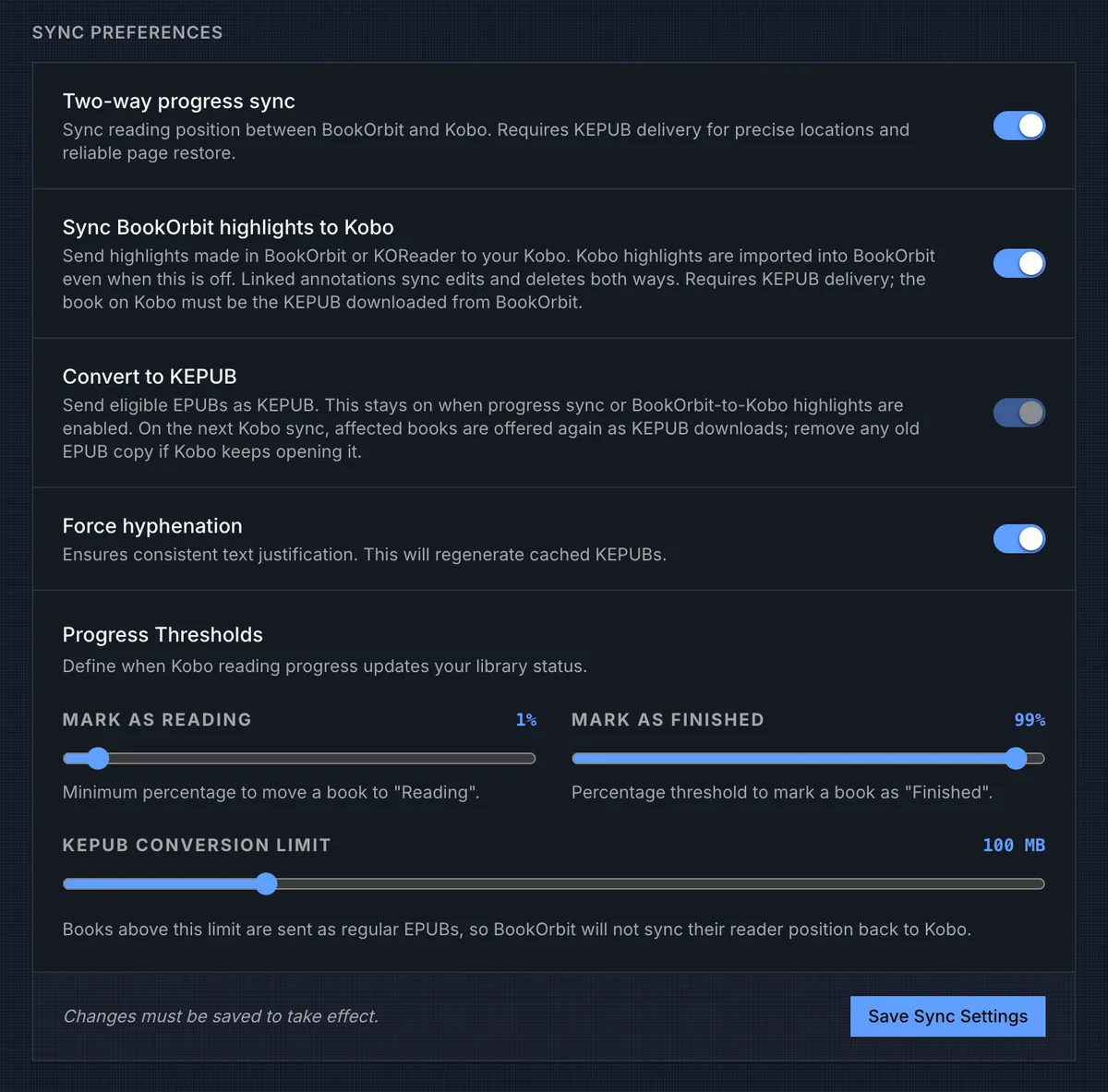
Preferences apply to the current BookOrbit user and must be saved before they change device behavior.
| Setting | Behavior |
|---|---|
| Two-way progress sync | Lets Kobo progress update BookOrbit’s shared reader position, and lets newer BookOrbit or KOReader progress update the Kobo bookmark. Kobo reading state and status thresholds are still stored when this is off. Precise restore requires KEPUB delivery. |
| Sync BookOrbit highlights to Kobo | Sends BookOrbit and KOReader highlights to Kobo when they can be placed in the KEPUB. Kobo highlights still import into BookOrbit when this is off. |
| Convert to KEPUB | Serves eligible EPUBs as KEPUB downloads. This is on by default and is forced on when two-way progress sync or BookOrbit-to-Kobo highlight sync is enabled. |
| Force hyphenation | Regenerates KEPUBs with kepubify hyphenation enabled. |
| Mark as Reading | Kobo progress at or above this percentage can move the BookOrbit book status to Reading. |
| Mark as Finished | Kobo progress at or above this percentage can move the BookOrbit book status to Finished. |
| KEPUB conversion limit | EPUBs above this size are sent as regular EPUBs, which prevents BookOrbit from sending precise Kobo restore positions or outbound highlights for those files. |
The reading threshold must be lower than the finished threshold. These thresholds control library status only; they do not decide whether Kobo reading state is stored.
KEPUB Delivery
Section titled “KEPUB Delivery”BookOrbit uses KEPUB as the bridge format for Kobo-specific positions. When conversion is enabled and the EPUB is under the configured size limit, the first Kobo download creates a cached .kepub.epub using kepubify. Later downloads reuse the cache until the source file identity or hyphenation setting changes.
If conversion fails, BookOrbit falls back to the original EPUB so the book can still download. That fallback is readable on Kobo, but precise BookOrbit-to-Kobo progress restore and BookOrbit-to-Kobo highlights depend on the KEPUB path.
When you enable progress sync, highlight sync, hyphenation, or change the KEPUB size limit, BookOrbit marks affected books for re-delivery. On the next Kobo sync, the device may offer those books again as downloads. If Kobo keeps opening an older EPUB copy, remove the old copy from the device and download the BookOrbit KEPUB.
Three-Way Progress
Section titled “Three-Way Progress”With Two-way progress sync enabled, BookOrbit connects the Kobo reader to the same progress record used by the web reader and KOReader.
| Direction | Behavior |
|---|---|
| Kobo to BookOrbit | Kobo reading state is stored. If two-way progress sync is enabled and the bookmark includes a KoboSpan location, BookOrbit converts it to the canonical web-reader and KOReader position when a matching KEPUB context is available. |
| BookOrbit to Kobo | Newer web-reader progress can be converted back into a KoboSpan bookmark when the Kobo asks for reading state. |
| KOReader to Kobo | KOReader progress lands in BookOrbit first. If Kobo two-way progress sync is enabled, that progress can advance the Kobo bookmark on the next Kobo sync. |
| Status updates | Kobo progress can update the BookOrbit book status using the Reading and Finished thresholds. |
That is the powerful part of the feature: Kobo, KOReader, and the BookOrbit web reader do not have to be separate progress islands. Read on the Kobo, sync, and BookOrbit can move KOReader forward later. Read in KOReader, sync, then let Kobo pick up the newer position during its next sync. BookOrbit keeps newer state from being overwritten by older device state, and KEPUB delivery is what makes the Kobo side precise instead of percent-only.
Highlights And Notes
Section titled “Highlights And Notes”Kobo highlight import is accepted for synced books. Highlights and notes made on the Kobo are written into BookOrbit annotations, with Kobo positions converted into BookOrbit and KOReader-friendly positions when the KEPUB context is available.
The Sync BookOrbit highlights to Kobo switch controls the opposite direction. When it is on, highlights made in BookOrbit or KOReader can be offered to Kobo. When it is off, BookOrbit still imports Kobo highlights, and annotations already linked to Kobo can continue syncing edits and deletes instead of becoming duplicates.
For outbound highlights, the book on the Kobo needs to be the KEPUB downloaded from BookOrbit. If the device is reading a regular EPUB, a manually copied file, or a file above the conversion limit, BookOrbit may not be able to place the highlight back on Kobo.
Reading Activity And Ratings
Section titled “Reading Activity And Ratings”Kobo sends more than bookmarks. BookOrbit ingests Kobo analytics events for synced books:
| Kobo event | BookOrbit result |
|---|---|
| Opening and leaving a book | Creates a reading session with duration, end progress, and progress delta when Kobo provides enough data. |
| Rating a book | Updates the user’s BookOrbit rating. A zero-star Kobo rating clears the rating in BookOrbit. |
Reading sessions use the active reading time Kobo reports. If Kobo reports idle time, BookOrbit subtracts it before saving the session.
Analytics are tied back to the synced EPUB-primary BookOrbit book. If a device event cannot be resolved to a BookOrbit-served book the user can access, BookOrbit skips that event instead of guessing.
Sync Activity
Section titled “Sync Activity”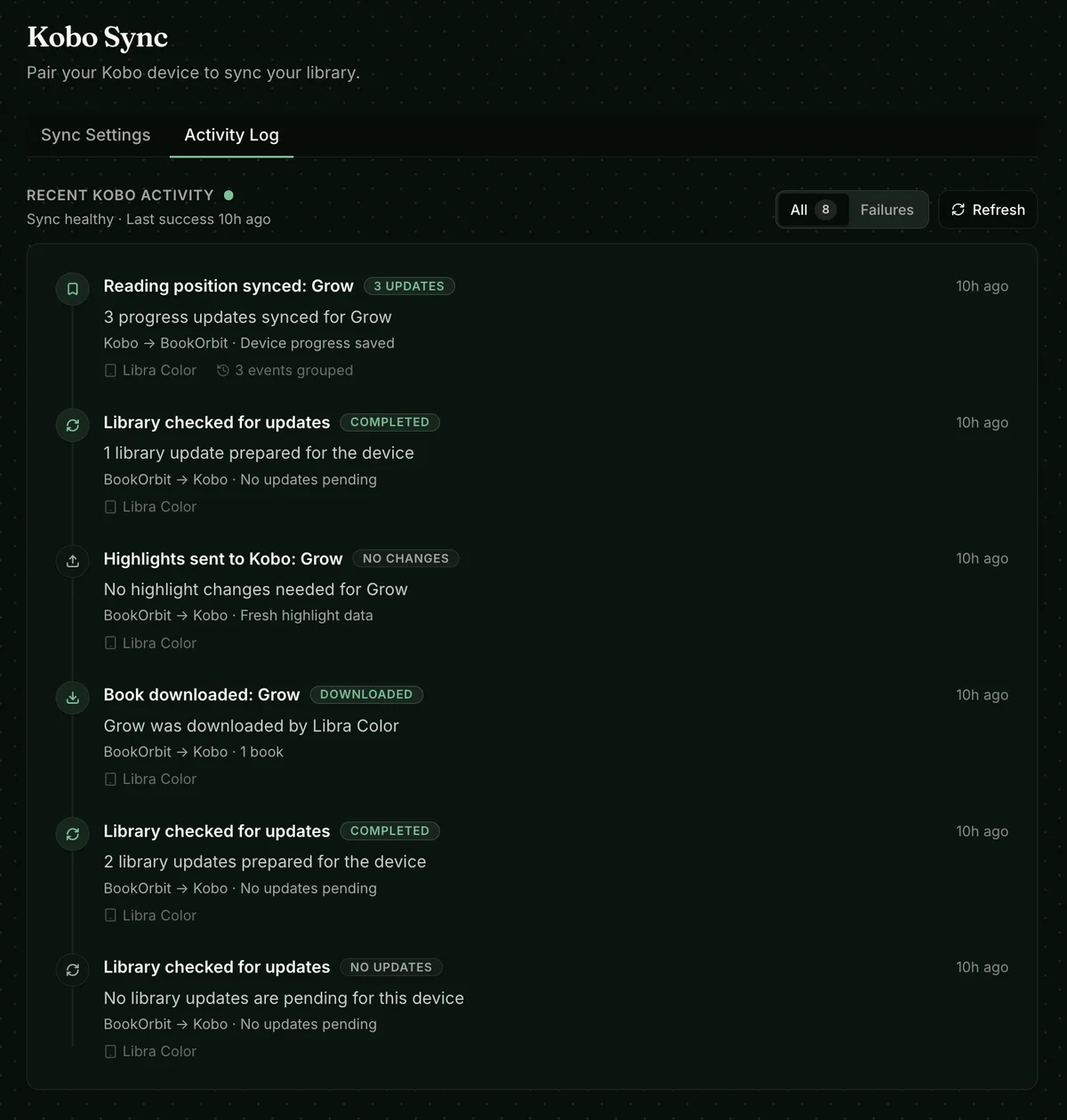
Open Settings > Kobo > Activity Log to inspect recent device activity. It records BookOrbit’s view of library checks, book downloads, reading-position updates, highlights received from Kobo, and highlights offered to Kobo.
Use Failures to show only unsuccessful operations. An entry includes the device, time, outcome, and, when available, the error class and message. Use Refresh after another device sync to reload the list. A successful library check with no updates means BookOrbit had no pending library changes for that device.
Troubleshooting
Section titled “Troubleshooting”| Symptom | Check |
|---|---|
| Kobo still syncs with Kobo instead of BookOrbit | Connect it over USB and confirm that .kobo/Kobo/Kobo eReader.conf, in [OneStoreServices], has exactly one api_endpoint line containing the BookOrbit sync URL. Save and safely eject the device before syncing again. |
| The Kobo cannot reach BookOrbit | Confirm the full sync URL includes /api/v1/kobo/{deviceToken} and is reachable from the Kobo’s Wi-Fi network. localhost and 127.0.0.1 point to the Kobo itself, not the BookOrbit server. |
| The sync URL was lost | Revoke the device and add it again. BookOrbit intentionally shows the token once. |
| No books appear | Confirm the user has kobo_sync, the books are in a Sync to Kobo collection, the books are present, content filters allow them, and the primary file is EPUB. |
| A shelf is missing or incomplete | Confirm that collection has Sync to Kobo enabled and contains eligible EPUB-primary books. |
| Deleted books keep returning | Remove the book from synced collections in BookOrbit, or disable Sync to Kobo for that collection. Deleting the local Kobo copy does not delete the BookOrbit book. |
| Kobo progress stores status but does not move reader position | Enable Two-way progress sync and make sure the book is delivered as KEPUB. |
| BookOrbit or KOReader progress does not reach Kobo | Enable Two-way progress sync, download the BookOrbit KEPUB on the Kobo, then run another Kobo sync. |
| Kobo highlights import but BookOrbit highlights do not appear on Kobo | Enable Sync BookOrbit highlights to Kobo and use the BookOrbit KEPUB copy of the book. |
| KEPUB conversion is skipped | Check the conversion limit. Files above the limit are served as regular EPUBs. |
| A changed KEPUB is not opening | Remove the older EPUB or KEPUB copy from the Kobo and download the book again from the BookOrbit account. |