
Creating a Read-Aloud
Some books you own twice: the EPUB you read on the train and the audiobook you listen to while you cook. Your place in one means nothing in the other.
A read-aloud EPUB is the same book as one file: the text, the narration, and a timing map that says which sentence is spoken when. The sentence being read lights up as it plays, and stopping the audio to read puts you exactly where the narrator left off. Storyteller Read-Aloud Books covers what that file does on every device.
You can bring one in from outside, or make it here. Create read-aloud takes the EPUB and audiobook already on a book, lines the narration up with the text, and adds the result as a new EPUB. The files you started from are never touched.
Before you start
Section titled “Before you start”- A worker is running. Matching is heavy, so a separate read-aloud worker does it, not the BookOrbit server. Whoever runs your server sets it up once; see Setting up the worker. Without one, the button does not appear.
- You have the permission. Generate read-aloud books (
library_generate_read_aloud), which also needs Upload books. Replacing an existing read-aloud also needs Delete books. Superusers have all three. See Users & Permissions. - The book has both halves. A plain EPUB and audiobook files on the same book, in a Folder as Book library (a File as Book library never offers the feature; see Library File Structure). An existing read-aloud EPUB cannot be the source, so the plain EPUB has to stay on the book if you ever want to regenerate.
The narration must be a recording of the same text. An abridged audiobook or a different edition still produces a result, but with gaps; that is what review is for.
Starting one
Section titled “Starting one”Open the book, go to Files, and press Create read-aloud.
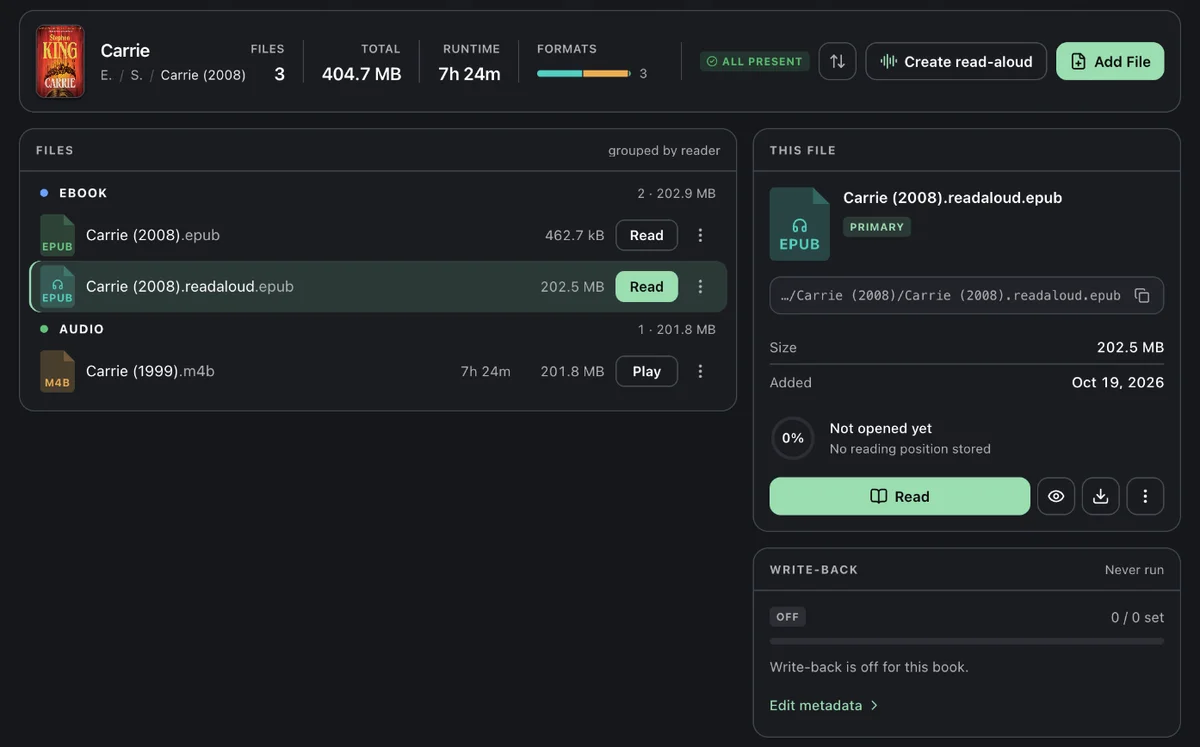
The button is hidden when no worker is configured or the book can never qualify (no audiobook, or a File as Book library). When it cannot work right now, it stays visible but inert and a line under the bar says why. Two of those reasons need a fix outside the book:
- The worker can’t reach this library’s folder. Mount the folder into the worker and list it in
READ_ALOUD_LIBRARY_ROOTS. A listed folder that was only mounted late, for example by an automount, is picked up once the worker can read it, with no restart. - This library doesn’t accept EPUB files. Add EPUB to the library’s Allowed formats under Settings > Libraries > Edit > Scanner.
One job takes at most 2,000 audio files, and a book runs one job at a time.
The dialog
Section titled “The dialog”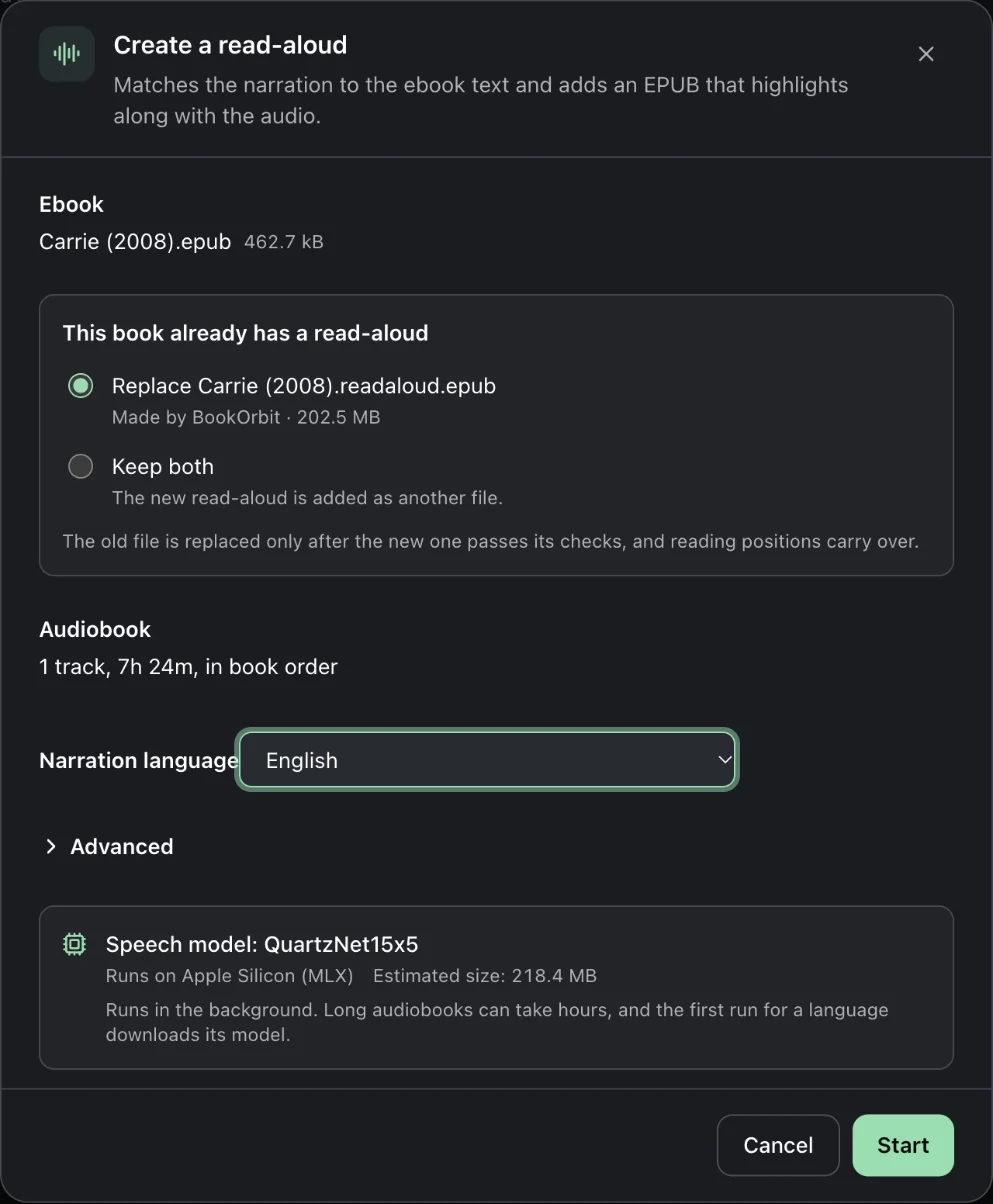
Ebook. The plain EPUB to match. Choose the one that matches the narration when the book has several.
Existing read-aloud. If the book already has one, the dialog asks what to do:
- Replace swaps the old file in place, for everyone who can open the book, and only after the new one passes its checks. Reading positions, sessions and highlights carry over. This is the default when BookOrbit made the old file (Made by BookOrbit). With several existing read-alouds, each is offered for replacement.
- Keep both adds the new one as another file. This is the default for an imported file (Imported, for example from Storyteller), so it is never overwritten by surprise.
A replaced file’s old content is gone for good, so replacing needs Delete books, the same as deleting a file. Without it, the dialog only offers adding the new one as another file. The permission is checked again when the output is published: if whoever publishes it no longer has Delete books, a new file is added instead and the job’s activity log says so.
Audiobook. Tracks are used in the book’s own order. With several tracks, Change order lets you reorder them or skip one.
Narration language. Required. BookOrbit pre-selects the book’s language when the speech model supports it, and leaves it empty otherwise. The model covers Arabic, Armenian, Catalan, Chinese, English, Faroese, French, German, Icelandic, Italian, Japanese, Kazakh, Maltese, Polish, Portuguese, Russian and Spanish, and BookOrbit never substitutes another.
Under Advanced, Highlighting is Sentence by default, which is the one to use. Word highlights each word, takes longer, makes a larger file, and is Experimental.
The summary at the bottom shows where the model will run, an estimated output size, and a Low disk space warning if the worker is short of working space.
While it works
Section titled “While it works”A Read-aloud card appears above the file list and keeps going if you leave the page.
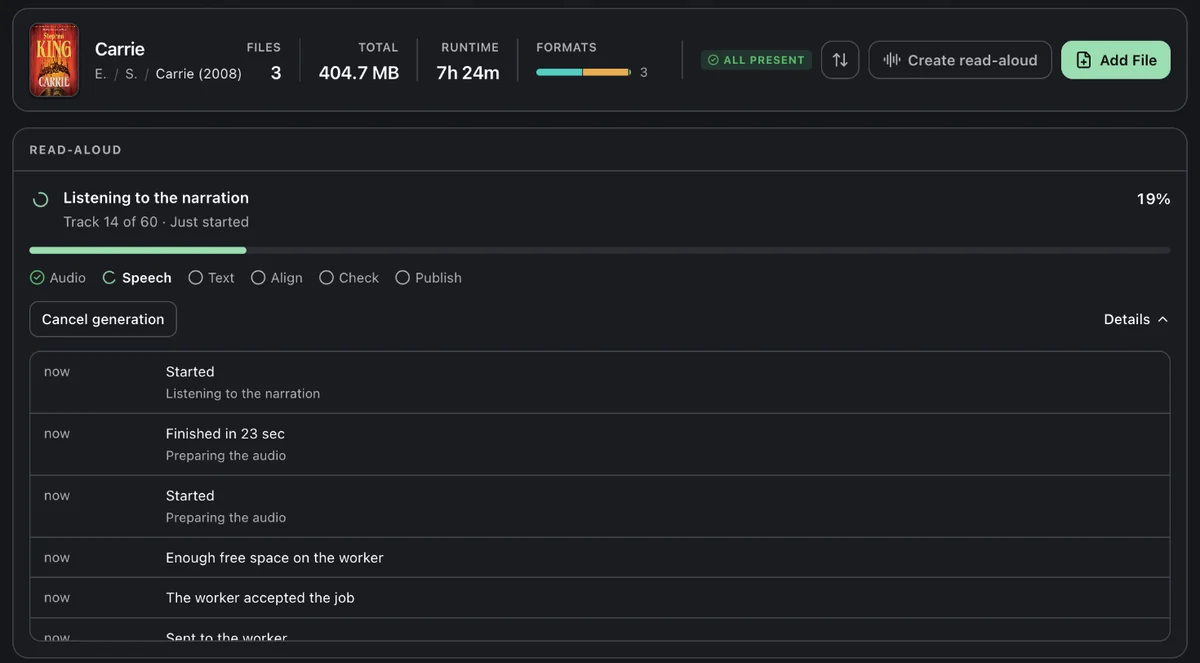
| Step | What happens |
|---|---|
| Audio | The audiobook is prepared, and split into tracks if it is one big file. |
| Speech | The worker listens to every track. This is the long one. |
| Text | The EPUB is marked up sentence by sentence. |
| Align | Spoken and written words are matched, chapter by chapter. |
| Check | The result is validated before anything touches your library. |
| Publish | The EPUB is added to the book. |
A job waiting its turn shows how many are ahead; the worker does one at a time. The first job in a language also downloads its speech model. Details opens the activity log, the first place to look if something stalls. Cancel generation stops at the next safe point and adds nothing. Once the output is being added to the book, the job can no longer be cancelled, including after a server restart interrupted that step.
On an Apple Silicon Mac with the native worker, a 7-hour audiobook took about three minutes in testing. The CPU-only Docker worker is slower, and long books can take hours there.
Do not move or replace the EPUB or the audio while a job runs; it fails with A selected file changed after the job started.
Only the person who started a job and superusers can cancel, retry, re-sync, publish or discard it. Other people who hold Generate read-aloud books and can open the book see that it is running; everyone else sees no card at all.
When it needs your eyes
Section titled “When it needs your eyes”A job waits for review when none of the text matched, an audio track could not be aligned, or more than a tenth of the story text found no place in the narration.
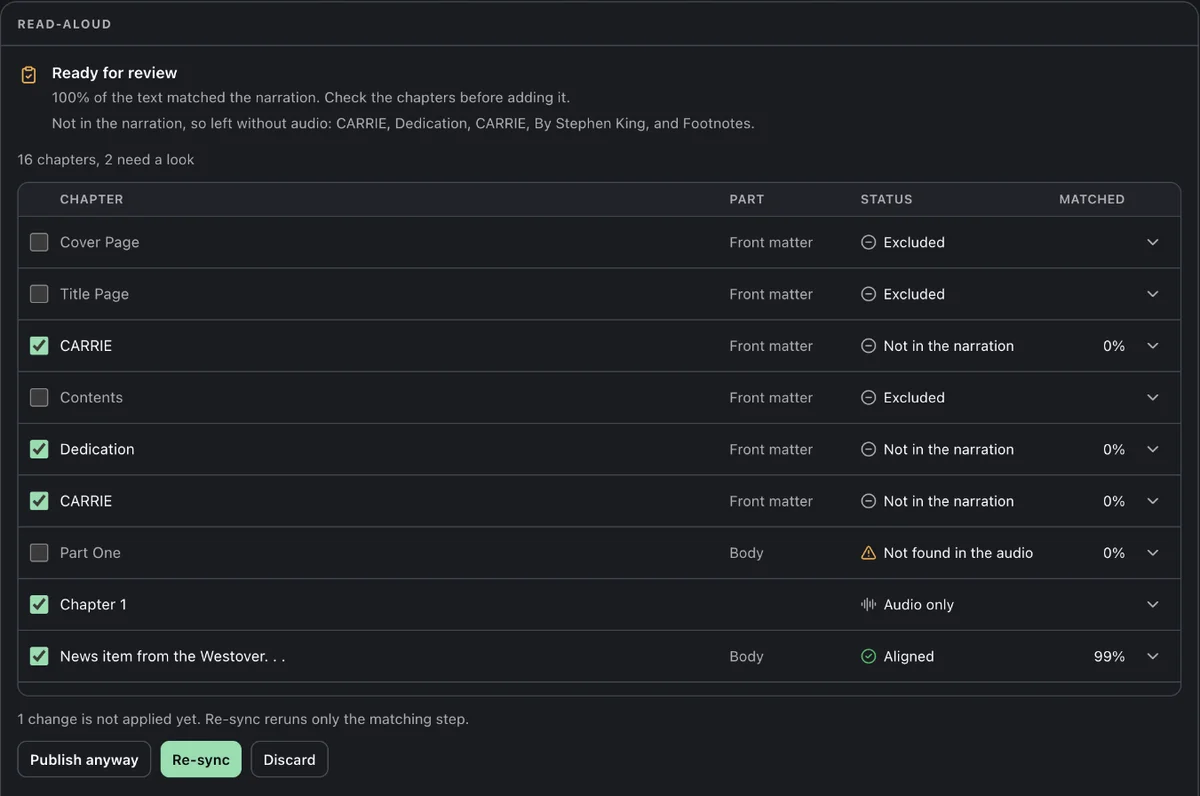
Every chapter is listed with a status and how much of its text matched:
| Status | Meaning |
|---|---|
| Aligned | Found in the narration. |
| Not found in the audio | The chapter’s text could not be located in the narration. |
| Too short to match | Too little text to match reliably. |
| Audio only | The narration covers this part, but there is no matching text to highlight. |
| Not in the narration | Front or back matter beyond where the narration starts and ends, such as the copyright page, contents or a sample of another book. Left without audio, and not counted against the result. |
The headline percentage is judged on the text the narration covers, from the first chapter that clearly matched to the last. A book can read 100% of the text matched and still wait for review, because an unaligned track is enough on its own; the rows show where.
Untick a chapter that should not be matched, such as a title page the narrator skipped. The card then says 1 change is not applied yet, and:
- Re-sync applies your changes and reruns only the matching step, reusing the earlier work.
- Publish anyway adds the output as it is.
- Discard adds nothing.
An unreviewed job gets a reminder after 7 days and is discarded after 14.
When it is done
Section titled “When it is done”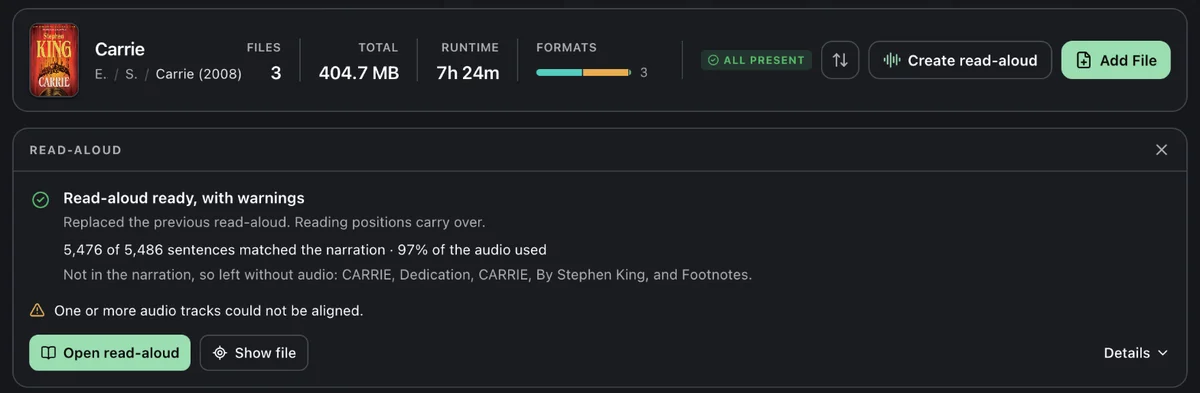
The card says whether the EPUB was added as a new file or replaced the previous read-aloud, how many sentences found their place, how much of the audio was used, and which chapters were left without audio. With warnings means the file is usable but worth a glance. Open read-aloud opens it in the reader, and Show file jumps to it.
The file is named <book>.readaloud.epub and sits in the book’s folder. Publishing ignores the admin upload size limit; the only cap is READ_ALOUD_MAX_OUTPUT_BYTES (20 GB by default), and BookOrbit checks the library volume has room first. Details keeps the chapter table after the job is finished.
From here the file is an ordinary read-aloud EPUB: Read Along on the web and iOS, narration on Apple Watch, and audio-free copies for Kobo and KOReader. Storyteller Read-Aloud Books covers each.
When it fails
Section titled “When it fails”The card says why, and the activity log has the detail. Retry continues from the last finished step; failed work is kept for 7 days. Start over reopens the dialog with the same choices.
A restart does not lose a running job. After a worker restart, the job resumes from its last finished step by itself. After a server restart, the server picks the job up again, and if the worker is still running it, the server takes that run back instead of starting another. A job interrupted 4 times this way fails instead, keeping its work for Retry.
The requester is notified, under Read-aloud generation in notification settings, when a job is ready, needs review, has a review about to expire, or fails.
Setting up the worker
Section titled “Setting up the worker”For whoever runs the server. The worker prepares audio, runs the speech model, matches the text and builds the EPUB. It reads libraries read-only and writes only to its own folder.
BookOrbit does not do this work inside the API server. The server sends jobs to one worker over HTTP, and the worker runs either in Docker or natively on the host. Choose one for a deployment. Both run the same worker code, and the server only knows its URL.
Which setup for my hardware
Section titled “Which setup for my hardware”| Your hardware | Worker | Where the model runs |
|---|---|---|
| Linux server, NAS or VPS | Docker | CPU. |
| Apple Silicon Mac | Native | MLX on the Mac’s Metal GPU. Docker Desktop cannot pass that GPU into a Linux container, which is why the native path exists. |
| Intel Mac or Windows | Docker | CPU. No native Windows worker is documented. |
| arm64 board, such as a Raspberry Pi | Docker, arm64 image | CPU. Expect it to be slow. |
| NVIDIA GPU | Docker | CPU, because the Docker image has no CUDA. A native Linux x64 worker has a cuda setting (CUDA 12 and cuDNN 9), but the project has not tested or measured it. |
Docker is the portable path. The native worker is simplest when the BookOrbit server also runs natively on the same Mac; pairing it with a server in Docker is an advanced setup, described below. On the CPU, long books can take hours; the one measured figure is under While it works.
The shared token
Section titled “The shared token”The server and worker authenticate with one random secret. Generate it once:
openssl rand -hex 32<shared-token> in the examples is a placeholder. Replace it with that generated value on both sides. It is not a BookOrbit user token, and the values must match exactly.
With Docker
Section titled “With Docker”Add to the deployment’s .env:
COMPOSE_PROFILES=read-aloudREAD_ALOUD_WORKER_URL=http://read-aloud-worker:8787READ_ALOUD_WORKER_TOKEN=<a-random-secret-of-at-least-16-characters>READ_ALOUD_WORKER_IMAGE=ghcr.io/bookorbit/bookorbit-read-aloud-worker:latestdocker compose up -d --waitThe image runs on the CPU, and READ_ALOUD_CTC_DEVICE=auto resolves to CPU inside it. Leave it there: the image contains neither CUDA nor a GPU driver for WebGPU, and a Linux container cannot reach a Mac’s Metal GPU, so cuda, webgpu or mlx stops the Docker worker at startup instead of running on the CPU.
It mounts your library at /books (read-only) and data/app/read-aloud for job folders, models and temporary files. Keep that folder on persistent storage: the first job in each language downloads its model (about 190 MB for English) from Storyteller’s model registry, which needs outbound HTTPS once.
Libraries in other folders. The worker only reads folders in READ_ALOUD_LIBRARY_ROOTS (comma-separated, default /books). For a library mounted elsewhere, mount it into the worker read-only at the same path and list it:
services: read-aloud-worker: volumes: - /srv/audiobooks:/audiobooks:roREAD_ALOUD_LIBRARY_ROOTS=/books,/audiobooksThe Compose setting READ_ALOUD_LIBRARY_ROOTS: ${READ_ALOUD_LIBRARY_ROOTS:-/books} means “use the configured value, or /books when it is unset or empty.” It controls which folders the worker may read; it does not select CPU or GPU. Changing the mounts or this list means recreating the worker with docker compose up -d.
The worker keeps checking which listed folders it can read while it runs. A folder that was not readable yet, such as a network share mounted after the worker started, is logged and left out, then becomes usable once it is readable, without a restart. Health checks reuse their answer for about 5 seconds, every job checks again, and a folder that does not answer within about 2 seconds, such as a hung mount, is left out of that check.
Keeping the token in a file. To keep the secret out of .env, set READ_ALOUD_WORKER_TOKEN_FILE instead of READ_ALOUD_WORKER_TOKEN, like other secrets. Compose passes the same path to the app and the worker, and each reads the file when it starts, so mount the file into both containers at that path, readable by PUID:
services: app: volumes: - ./secrets/read-aloud-worker-token:/run/secrets/read-aloud-worker-token:ro read-aloud-worker: volumes: - ./secrets/read-aloud-worker-token:/run/secrets/read-aloud-worker-token:roREAD_ALOUD_WORKER_TOKEN_FILE=/run/secrets/read-aloud-worker-tokenThe file holds only the token; a trailing newline is fine. Setting both variables, or a file a container cannot read, stops that container at startup.
Natively, for Apple Silicon
Section titled “Natively, for Apple Silicon”Docker Desktop on a Mac cannot reach the GPU. To use it through MLX, run the worker natively. This path is simplest when the BookOrbit server also runs natively on the same Mac. You need Node.js 24 or later, pnpm, and ffmpeg with ffprobe version 7 or newer (brew install ffmpeg). The worker refuses to start with an older one.
From a checkout of the BookOrbit repository:
pnpm installpnpm --filter @bookorbit/types buildpnpm --filter @bookorbit/read-aloud-worker build
READ_ALOUD_WORKER_TOKEN=<shared-token> \READ_ALOUD_LIBRARY_ROOTS=/path/to/library \READ_ALOUD_WORK_ROOT=/path/to/app-data/read-aloud/jobs \READ_ALOUD_CTC_DEVICE=auto \pnpm --filter @bookorbit/read-aloud-worker start
READ_ALOUD_LIBRARY_ROOTS takes a comma-separated list. For a single folder, READ_ALOUD_LIBRARY_ROOT=/path/to/library works too; when both are set, READ_ALOUD_LIBRARY_ROOTS is used. Compose always sets READ_ALOUD_LIBRARY_ROOTS, so the single-folder form is only for a native worker.
The native worker does not read the server’s .env file and is not started by pnpm dev. The variables above belong to the process that launches the worker. Keep that command running in a separate terminal, or configure it as a macOS background service.
The worker must see book files at the same absolute paths as the server, and its job folder must be the server’s <APP_DATA_PATH>/read-aloud/jobs. Point the server at it with the same token:
READ_ALOUD_WORKER_URL=http://127.0.0.1:8787READ_ALOUD_WORKER_TOKEN=<shared-token>A native worker listens on 127.0.0.1 only. When it starts on an Apple Silicon Mac with auto, its health response reports configuredDevice: auto and device: mlx; MLX uses Metal underneath.
Running the BookOrbit server in Docker while running this worker on the Mac is an advanced setup, not a drop-in replacement. 127.0.0.1 inside the app container is the container itself, and the server’s /books/... paths must exist under the same spelling on the Mac. Unless both networking and identical paths are deliberately arranged, use the Docker worker with a Dockerized server.
To reach a native worker from another process or machine, set READ_ALOUD_WORKER_HOST and keep the port off untrusted networks; the shared token is the only protection. PORT changes the port from 8787.
What STAlign and Ghost Story do
Section titled “What STAlign and Ghost Story do”BookOrbit fixes the model family to QuartzNet15x5. The selected narration language chooses its weights, for example quartznet15x5_en for English. The device setting chooses where those weights run; it does not choose a different speech model.
STAlign prepares the audio and EPUB, asks Ghost Story to generate speech probabilities, then matches those probabilities to the existing EPUB text and writes the media-overlay EPUB. Ghost Story resolves, downloads and loads the language-specific model through MLX or ONNX Runtime. The model is not transcribing the book; it supplies timing information for alignment.
Where the model runs
Section titled “Where the model runs”READ_ALOUD_CTC_DEVICE picks the runtime:
| Value | Runtime |
|---|---|
auto | MLX on native Apple Silicon, otherwise CPU. |
cpu | Everywhere; the only option in the Docker image. |
mlx | Native macOS on Apple Silicon. |
cuda | Native Linux x64 with CUDA 12 and cuDNN 9; never chosen by auto. Not tested by the project. |
webgpu | Experimental; not available on Linux arm64. |
An explicit setting the host cannot run stops the worker at startup instead of quietly falling back to the CPU. With cuda or webgpu, the worker also opens a tiny bundled model on that device at startup and refuses to start, with the reason in its log, if ONNX Runtime cannot use it.
The worker’s health response reports its version (the release for the Docker image, the package version for a native worker), the configured device, the device in use, whether that device was checked at startup, the library folders it can read, and the free space in its data folder. The version is also on the worker’s first log line.
Disk space
Section titled “Disk space”A run needs about four times the size of the audio, plus seven times the EPUB, plus the model’s working data (about 115 MB for a 10 hour book), plus 512 MB. The worker fails the job with insufficient_storage if that is not free, and the dialog warns beforehand. Publishing needs one more copy of the output on the library volume.
Troubleshooting
Section titled “Troubleshooting”Language says it is not supported. The book’s recorded language is not one the model covers, or is recorded in a form BookOrbit does not recognise. Choose it yourself from the list.
Almost everything landed in review. Check the language, then the edition. A different or abridged recording will not line up with the EPUB, and no setting fixes that.
The worker can’t reach this library’s folder. Check that the folder is mounted into the worker at the same path the server uses and listed in READ_ALOUD_LIBRARY_ROOTS. If it is listed and only mounted late, nothing needs restarting: the worker picks it up within seconds of it becoming readable. Its log says when a listed folder is not readable, and again when it is back.
The worker will not start. Check its log. It refuses to start when READ_ALOUD_CTC_DEVICE names a device the host cannot run, including cuda or webgpu when ONNX Runtime cannot open that device; set it back to auto. A native worker also refuses an ffmpeg or ffprobe older than version 7. In Docker, setting both READ_ALOUD_WORKER_TOKEN and READ_ALOUD_WORKER_TOKEN_FILE, or a token file the container cannot read, stops it too.
The worker needs an update. The server and worker speak a versioned protocol, and this worker’s does not match the server’s. Run a worker from the same BookOrbit release as the server: pull the image again, or rebuild a native worker from a matching checkout. The worker’s version is in its health response and on its first log line.