
KOReader Sync
KOReader sync starts with a small account in BookOrbit, then becomes a background conversation between the reader and the library. The device reports where you are, what you read, and which highlights changed. BookOrbit matches that back to the book file, updates the book page, and keeps enough state to send newer changes back on the next sync.
For installation, the plugin menu, and the catalog browser, see KOReader Plugin.
Three-Way Sync
Section titled “Three-Way Sync”The powerful part is that KOReader does not have to live in a separate lane. BookOrbit can sit between the web reader, KOReader, and Kobo, keeping the newest reading position and annotation state moving through the same book record.
With Kobo two-way progress sync enabled, progress reported by KOReader can advance the Kobo bookmark on the next Kobo sync. Progress from Kobo can also update BookOrbit, and a later KOReader sync can pick up that newer BookOrbit position. For highlights, KOReader changes land in BookOrbit first; if Sync BookOrbit highlights to Kobo is enabled in Kobo settings, those BookOrbit and KOReader highlights can be offered to Kobo as well. Kobo highlight import works independently, and linked annotations can continue syncing edits and deletes through BookOrbit.
Kobo-side return sync depends on Kobo settings and KEPUB delivery. If Kobo is sending regular EPUBs instead of KEPUBs, BookOrbit may still record progress, but precise Kobo restore and BookOrbit-to-Kobo highlight placement are limited.
What Comes Back To BookOrbit
Section titled “What Comes Back To BookOrbit”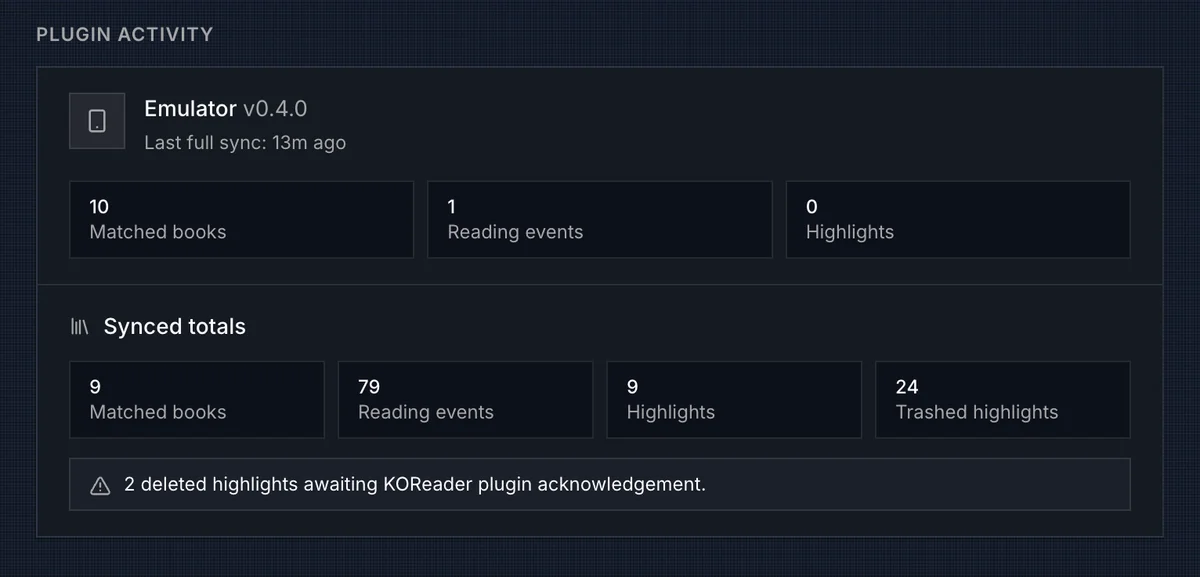
The settings page becomes useful after the first book sync or full sweep. Devices shows the last device progress update and the last book title seen from that device. Plugin Activity shows the richer plugin path: for each device, the plugin version with an up-to-date or update-available badge, the last full sync time, matched books, reading events, and highlights. A Synced totals summary below that shows aggregate counts across all devices. A Setup Guide section at the bottom walks through pairing steps for new users.
BookOrbit stores several kinds of KOReader state:
| Data | How BookOrbit uses it |
|---|---|
| Progress | Stores a per-device KOReader position, updates BookOrbit file progress, and auto-updates the user’s book status when progress crosses the app’s normal thresholds. |
| Reading events | Converts KOReader page-stat events into reading sessions, reading-log rows, daily stats, and achievement activity. |
| Highlights and notes | Creates or updates BookOrbit annotations with KOReader text, note, style, color, chapter, page, and device position. |
| Annotation deletes | Soft-deletes the matching BookOrbit annotation and tracks whether other devices still need to acknowledge the delete. |
| Book status | Maps KOReader reading, complete, and abandoned states to BookOrbit Reading, Finished, and Abandoned when the device change is newer. |
| Rating | Writes a KOReader 1-5 rating to the user’s BookOrbit rating when the device change is newer. A missing device rating does not clear the BookOrbit rating. |
Reading sessions are derived from page-stat clusters. Events within a 30 minute gap stay in one session; a longer gap starts another session. Very short sessions under 10 seconds are ignored. If an older sync later fills a gap, BookOrbit can recompute the sessions for that device and file so the reading log stays consistent.
Position Sync
Section titled “Position Sync”Progress moves both ways. When KOReader syncs, BookOrbit updates the book’s file progress, read status, and book detail progress source. When KOReader opens a book, reconnects, or pulls progress manually, BookOrbit sends back the newest known progress for that file.
| Newer source | What KOReader receives |
|---|---|
| KOReader | The last KOReader position for that device/book file. |
| BookOrbit web reader | The latest BookOrbit reading position, translated as closely as possible for KOReader. |
KOReader-to-BookOrbit restore is usually the most exact path because it starts with a native KOReader position. BookOrbit-to-KOReader restore may land nearby rather than at the exact line when the position came from another reader.
Highlight Sync
Section titled “Highlight Sync”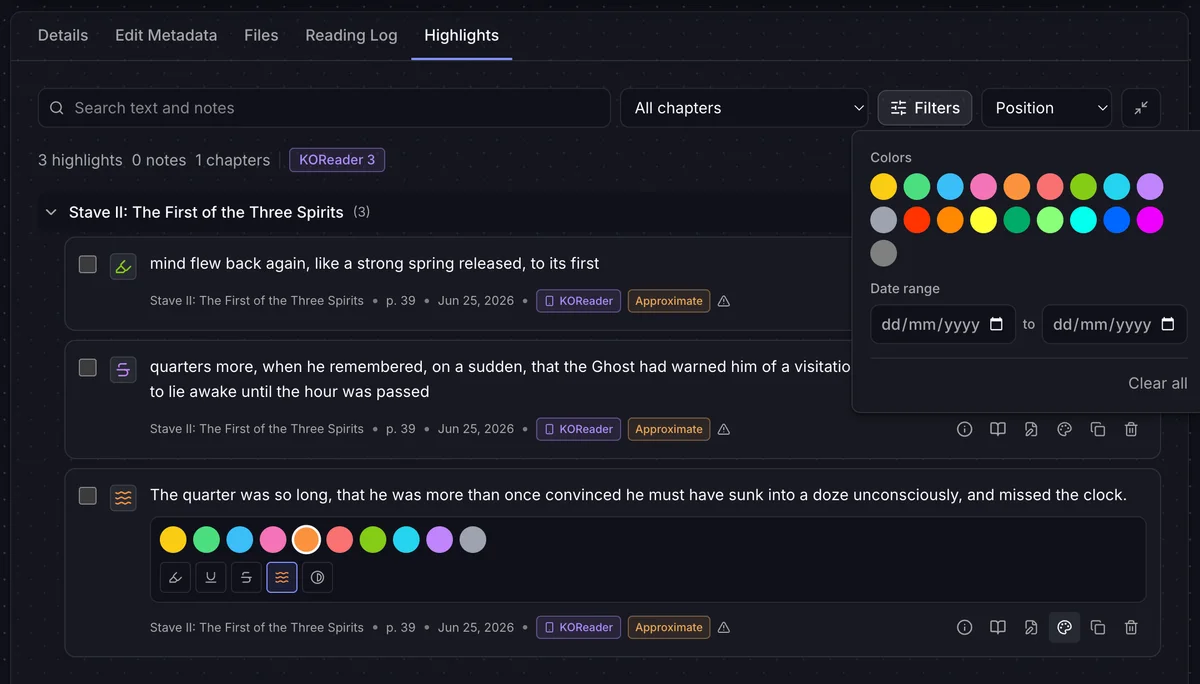
Highlight sync is bidirectional with the BookOrbit plugin. Highlights, notes, style changes, and deletes made in KOReader can appear in BookOrbit annotations, and BookOrbit annotation changes can return to KOReader on the next sync.
KOReader annotations appear in the Highlights tab with a KOReader source badge. Highlights that BookOrbit could not place at an exact text position are tagged Approximate - the text is preserved, but the anchor is best-effort. The Highlights tab lets you filter by color, highlight style, and date range so you can work with large annotation sets from multiple sources.
BookOrbit keeps enough device state to avoid turning edits or moved highlights into duplicates. Deletes are also tracked until the device confirms that it applied them, which is why the settings page can show pending deleted highlights.
Colors and highlight styles are mapped between KOReader and BookOrbit palettes. Most highlights sync quietly; if BookOrbit cannot place a highlight back into KOReader, it is counted under failed positions so you know something needs attention.
Reading Log And Book Pages
Section titled “Reading Log And Book Pages”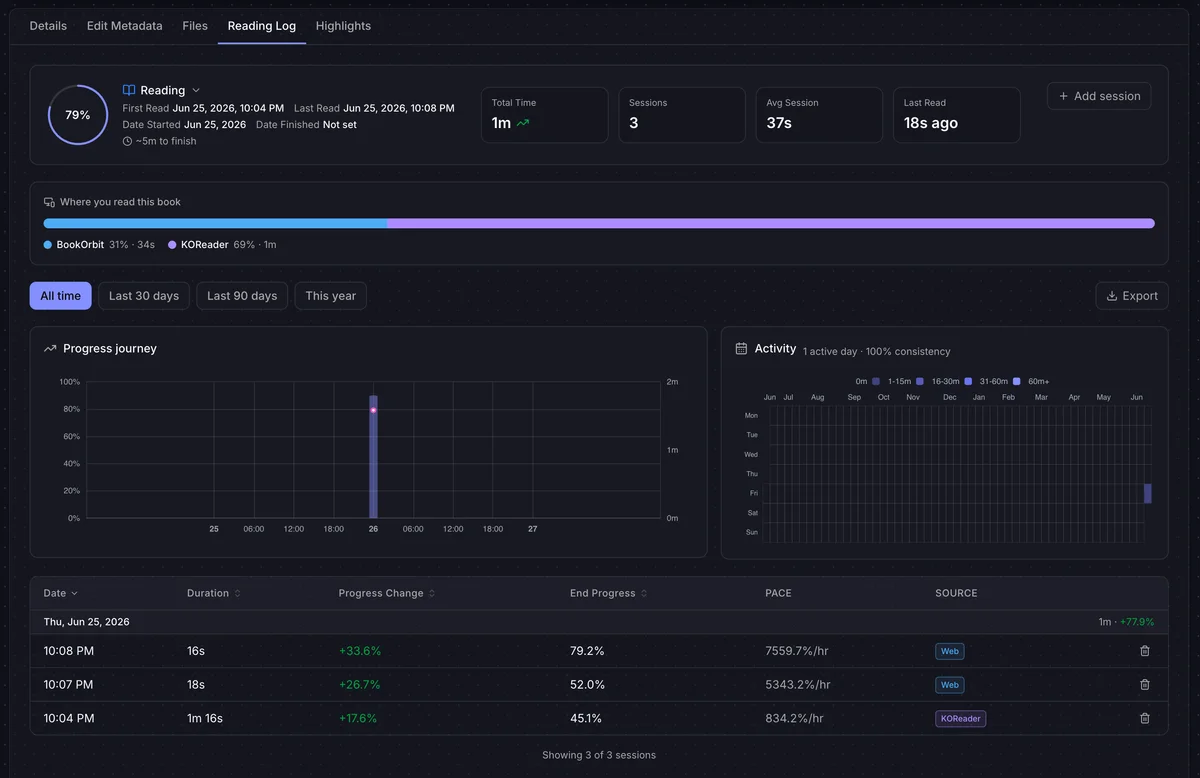
KOReader sessions appear in the same reading log as manual and web-reader sessions, with KOReader as the source. The Reading Log tab shows a Where you read this book breakdown bar that splits total reading time across BookOrbit, KOReader, and Kobo sources, so you can see at a glance how much of a book came from the device. Progress from KOReader also appears on book details as a KOReader progress source when the user has koreader_sync.
On a book page, BookOrbit keeps the canonical progress source by timestamp. If KOReader has the newest update, the KOReader percentage and chapter are shown. If the web reader is newer, the web-reader progress remains canonical. BookOrbit also records when a file was modified after the last KOReader sync so stale device state can be surfaced.
Troubleshooting
Section titled “Troubleshooting”For plugin setup, catalog, and login issues see KOReader Plugin - Troubleshooting.
| Symptom | Check |
|---|---|
| No books match | Confirm the same book files exist in BookOrbit, the user can access their libraries, and the device copy has not been modified into a different document fingerprint. |
| Progress appears but no reading sessions appear | Confirm the BookOrbit KOReader plugin is installed and has uploaded page statistics. |
| Highlights do not move both ways | Enable Two-way highlight sync in the KOReader plugin menu and run another sync for the book. |
| Deleted highlights remain pending | Sync the KOReader device again so it can acknowledge the delete. Pending deletes are kept until the device reports that it applied them. |
| Restore lands near the chapter, not the exact line | BookOrbit may only have an approximate translated position for that direction. Open and sync the book once from KOReader to store a native KOReader position. |
| Sync does nothing at all, with no error | A login proxy in front of BookOrbit is answering with its sign-in page. See Authentication Proxies. |