
Setting Up AI
BookOrbit does not ship with a model. You connect one: a hosted service you already pay for, a router that picks a model for you, or something running on your own machine. This page walks through connecting a provider, choosing the models, switching features on and setting a budget.
Everything here lives in Settings > Server > AI and needs the App settings permission (manage_app_settings).
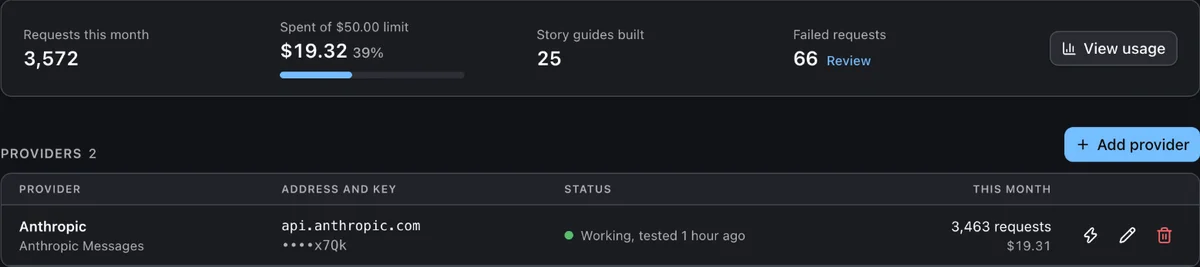
The page reads top to bottom in the order you will use it: providers, models, features, spending.
Quick start
Section titled “Quick start”- Set the encryption key and restart the server (below).
- Open Settings > Server > AI, select Add provider, choose your provider, paste its API key, and select Test.
- Under Models, pick a model for Fast and for Careful. Pick one for Vision only if you want the AI to read photos.
- Under Features, switch on what you want and confirm what it sends.
- Under Spending, set a monthly limit.
- Build a story guide for a book.
Before you start: the encryption key
Section titled “Before you start: the encryption key”A provider’s API key is a secret, so BookOrbit stores it encrypted. The key that does the encrypting is AI_ENCRYPTION_KEY, a 64-character hex string that you generate once and keep:
openssl rand -hex 32Put the result in the .env file beside your other secrets, then restart the server.
AI_ENCRYPTION_KEY=paste-the-64-characters-hereWith the Docker image you can mount the key as a file instead and point AI_ENCRYPTION_KEY_FILE at it, the same way JWT_SECRET_FILE works.
Without the key, the AI page shows a banner with the command above, and a connection that has a key is refused rather than stored in the clear. A connection that needs no key, such as a local Ollama, saves without it.
Add a provider
Section titled “Add a provider”Select Add provider. The first step is a list of presets.
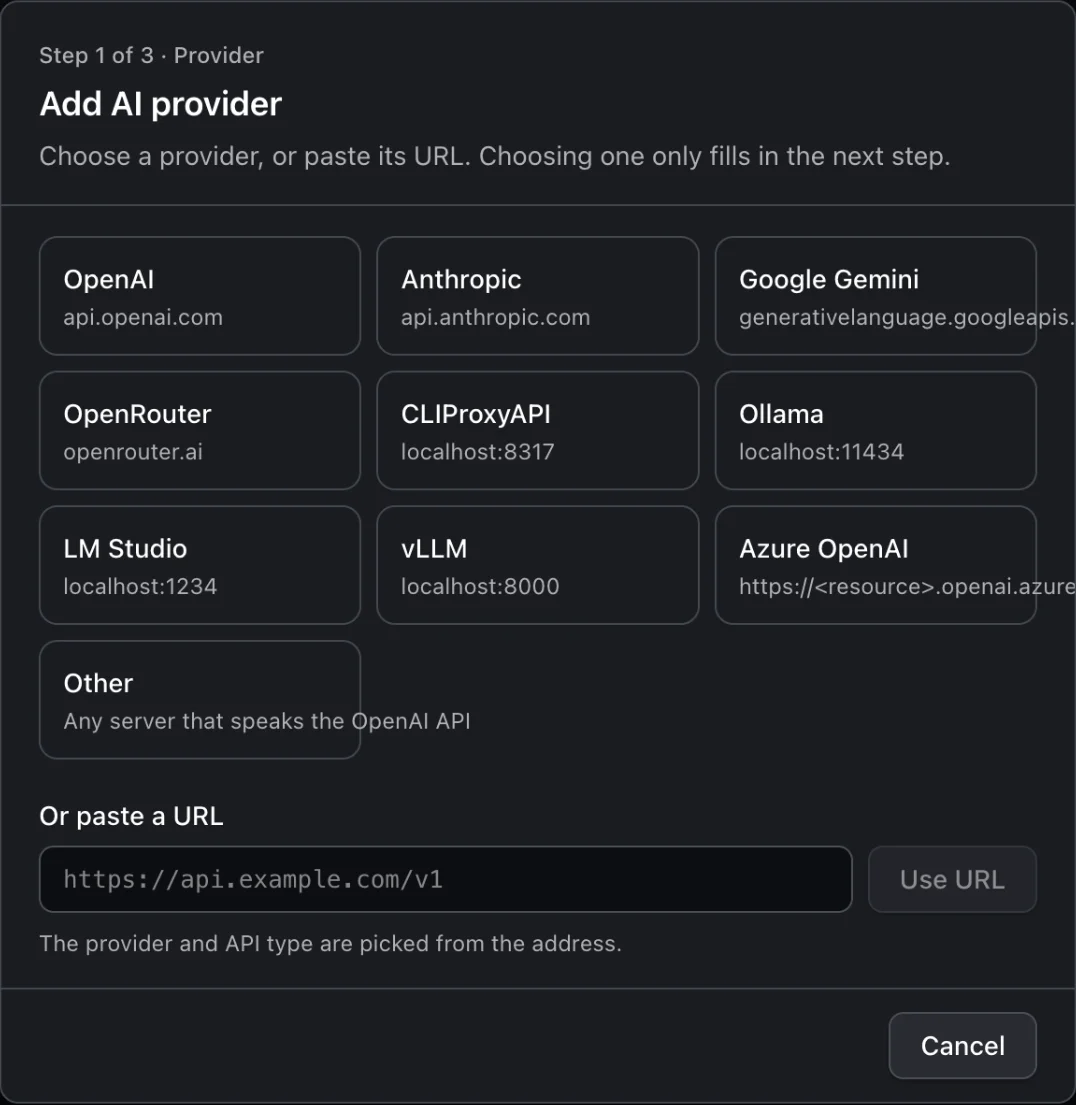
Pick the one you use. A preset only fills in the next step, so every field can still be changed afterwards. If you already have the provider’s address, paste it under Or paste a URL instead and BookOrbit picks the preset and API type from it.
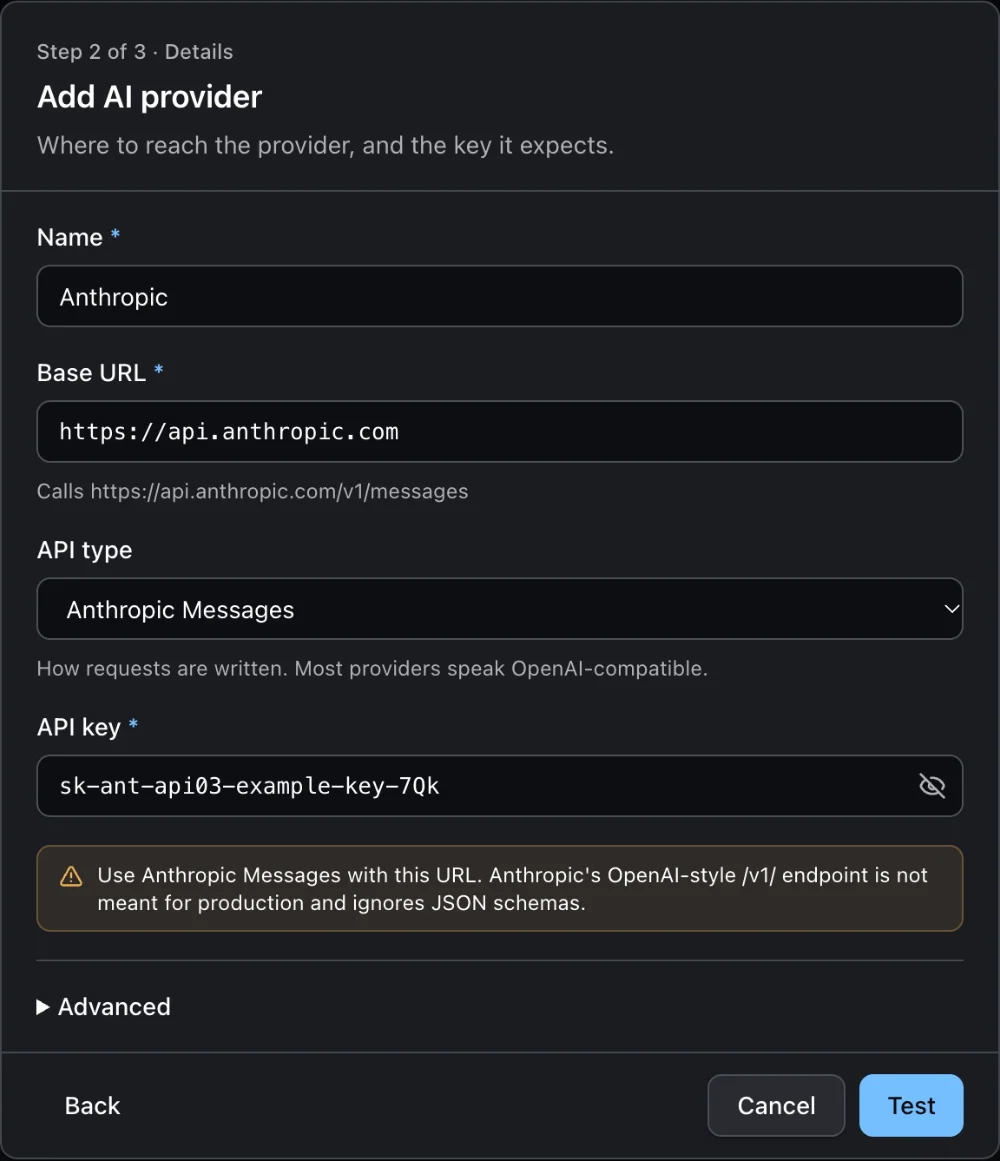
| Field | What to enter |
|---|---|
| Name | Anything that will mean something to you in a list. |
| Base URL | The provider’s address. A pasted endpoint such as .../v1/chat/completions is trimmed to its base, and the form shows the exact URL requests will go to. |
| API type | How requests are written. OpenAI-compatible (Chat Completions) fits most providers and proxies. Use Anthropic Messages for Anthropic itself, and for Claude behind a proxy that offers it, because that is where a JSON schema is enforced. OpenAI Responses is there for providers that use it. |
| API key | Optional for a local runner. After saving, only the last four characters are shown. |
Advanced holds extra headers (their values are hidden after saving), an HTTP proxy, DNS servers, a timeout, how many requests may run in parallel, and a requests-per-minute limit for providers that are strict about it.
The test that runs on save
Section titled “The test that runs on save”Select Test. BookOrbit sends one very small request for each thing it needs to know:
- The server is reached.
- The key is accepted.
- The provider lists its models.
- A model answers in JSON, and the test says how reliably: JSON schema enforced, JSON mode, or Instructions only.
- Token usage is reported, which is how cost is counted.
- A model can read a picture. This one matters only for the Vision slot and never changes whether the test passes.
Test model names the model the test asks, and can be changed to test another. If a check fails, the ones after it are marked not checked.
You can save a connection even when a check fails, because a provider can simply be down for a minute. One that fails for a reason that may pass by itself, such as a timeout or a rate limit, is tested again every 15 minutes for a day. Test on a provider’s row, the lightning bolt, runs it again by hand.
Some presets carry a warning in the form. The ones to know about:
| Preset | What the form says |
|---|---|
| Anthropic | Use the Anthropic Messages API type with this URL. Anthropic’s OpenAI-style endpoint is not meant for production and ignores JSON schemas. |
| Google Gemini | Google calls this endpoint beta, and rejects API keys that have no restrictions. |
| OpenRouter | Requests ask OpenRouter to use only providers that support every parameter, so a model without JSON schema support fails instead of returning loose text. |
| CLIProxyAPI | Use a client key from its api-keys list, not the Management Center key. |
| Ollama and LM Studio | Small local models are unreliable at JSON. LM Studio warns that models under 7B often cannot follow a JSON schema. |
| Azure OpenAI | The model field takes a deployment name, and the key goes in the api-key header. |
Subscriptions are not keys
Section titled “Subscriptions are not keys”A ChatGPT, Claude or Gemini consumer plan signs in with an account, not an API key, and BookOrbit does not do those sign-ins. Anything that offers one of the three API types works, including a proxy you run yourself. Whether a given proxy is allowed is between you and your provider.
Choose the models
Section titled “Choose the models”The AI does three kinds of work, and each kind has a slot: a job you pick a model for. Each slot is pointed at one of your providers and one of its models.
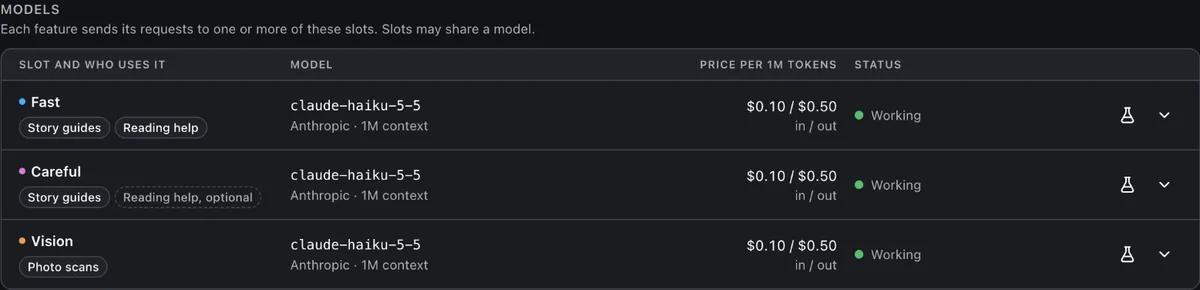
| Slot | What it is for | What suits it |
|---|---|---|
| Fast | Many small requests, such as reading each passage. | A quick, inexpensive model. |
| Careful | Fewer requests that need the best judgement, such as the final review of a story guide. | The strongest model you are happy to pay for. |
| Vision | Requests that carry a picture, such as photo scans. | A model that reads images. |
Two slots may share a model. Prices, in dollars per million input and output tokens, are filled in when the provider’s model list carries them (OpenRouter does) and can be typed in otherwise. A slot without prices cannot count dollars, so BookOrbit counts builds instead; see Spending.
The flask on each row is Try it. It runs a short passage from a public-domain book through the slot and shows what the model found, how long it took and what it cost, which is the cheapest way to judge a model before spending a real build on it. On the Vision slot, it sends a picture and lists the books it read.
Switch the features on
Section titled “Switch the features on”Each feature has a switch, its own limits, and an optional share of the budget.
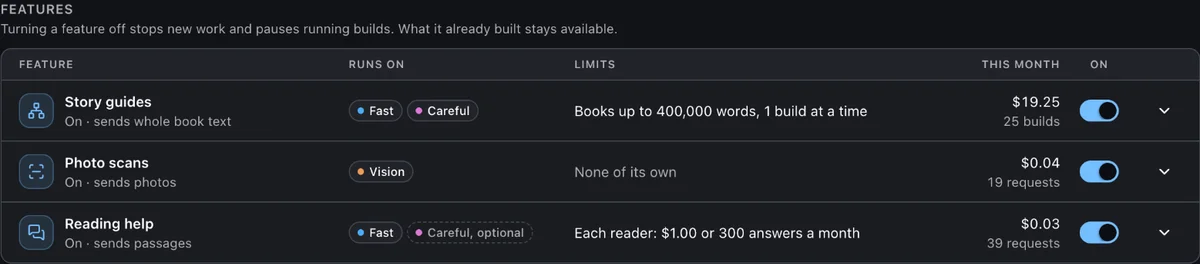
Turning a feature on for the first time asks you to confirm what it sends to the provider; What is AI in BookOrbit? lists it for each feature. The page records who confirmed it and when, and shows that line when the feature’s row is open.
Turning a feature off stops new work and pauses anything running. What it already built stays available, because serving a finished story guide sends nothing to the provider.
Open a row’s arrow to see its limits.
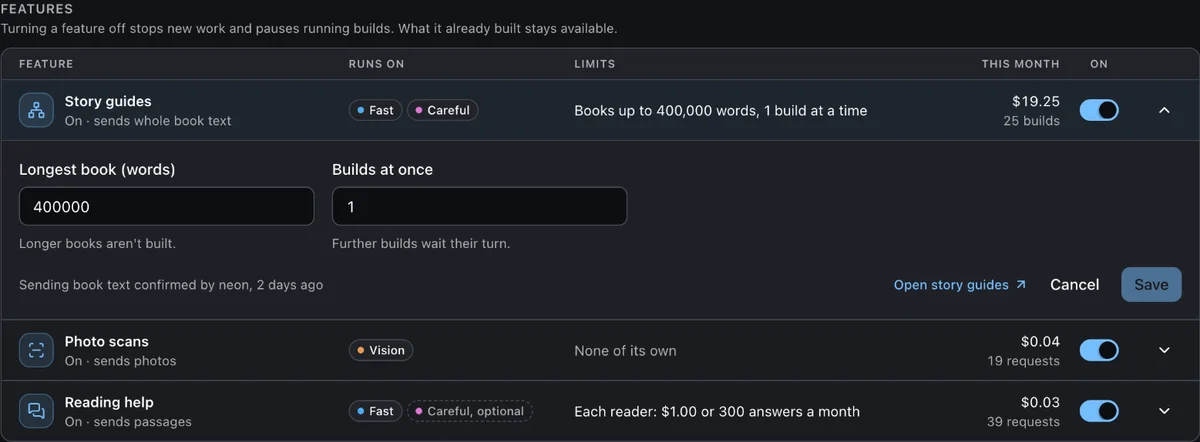
| Feature | Limits | What they do |
|---|---|---|
| Story guides | Longest book (words) and Builds at once | Longer books are not built, and a second build waits for its turn. The defaults are 400,000 words and one build at a time. |
| Photo scans | None of its own | Spending only, through the budget. |
| Reading help | Each reader, per month (dollars) and answers per month | A reader’s share. See below. |
Reading help and each reader’s share
Section titled “Reading help and each reader’s share”Reading help is used by every reader on the server, so it carries a per-reader allowance on top of the budget.
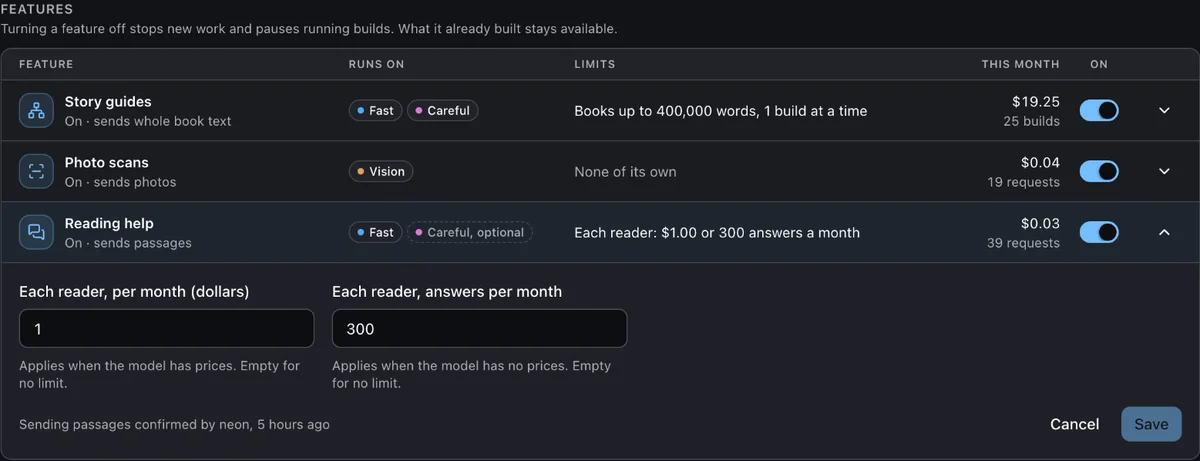
Each reader may spend $1 a month when the slot has prices, or make 300 answers a month when it does not. Either number can be changed, and an empty field removes that limit. A reader who reaches their share gets a message in the app until the month turns, or the phone writes the answer itself where it can. Answers that come from the shared cache do not count against it.
The Fast slot writes every answer. If the Careful slot has a model, readers also get an Ask More Carefully button on each answer, which asks again with the stronger model. Leave Careful empty and the button is simply not offered.
Spending
Section titled “Spending”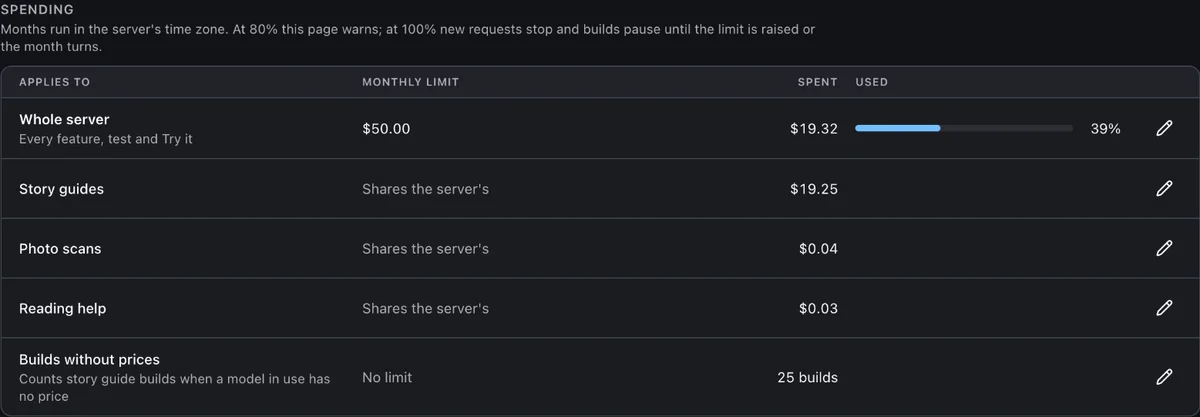
- A monthly limit for the whole server, and optionally a limit for each feature. A feature without its own limit shares the server’s. Months run in the server’s time zone (
TZ). - At 80% the page warns. At 100% new requests stop and builds pause until the limit is raised or the month turns.
- A story guide reserves its estimate when it starts, so one that does not fit in what is left waits instead of stopping halfway. A build that has spent three times its estimate pauses until someone chooses to continue or cancel it.
- Builds without prices counts story guide builds when a model in use has no price, with a limit of its own.
View usage opens the month’s requests, tokens, estimated cost and errors, broken down by feature and model, plus the costliest builds and the most recent errors. Export CSV downloads the same months. Request-level detail is kept for 90 days, then folded into monthly totals.
Running a model at home
Section titled “Running a model at home”A model on your own machine keeps every passage and photo on your network. Ollama, LM Studio and vLLM are all in the preset list, and they usually need no key.
Two things to know before choosing one:
- Use a model that can follow a JSON format. A story guide asks the model for structured JSON many times, and small models often return JSON that is slightly off. Run Try it on the slot first.
- Where BookOrbit runs decides the address. From inside Docker,
localhostis the container itself, so reach a model on the host machine throughhost.docker.internalinstead, as described in Kokoro Text-to-Speech.
If something does not work
Section titled “If something does not work”| What happened | What to try |
|---|---|
| A banner asks for an encryption key | Generate one with the command above, add it to .env, and restart. |
| The saved key can’t be read | The encryption key changed. Edit the provider and type its key again. |
| The test says the key was refused | Check the key has not expired and belongs to the account the model is billed to. |
| The test passes but a build pauses | Open the book’s Story guide card; it says why. Common causes are a spent budget, a provider outage, or an empty slot. |
| Try it on the Vision slot finds no books, or the test’s picture check fails | Pick a model that accepts images for the Vision slot, then run Try it on it again. |
| A feature shows in the iPhone app as unavailable | The feature is off, or its slot has no model. The app asks the server and only offers what is on. |